



Most of these tips take minutes to implement. None require advanced technical skill. If you’re new to SEO entirely, it helps to first understand the fundamentals covered in our complete SEO basics guide for business owners before diving into this checklist, since these tips build on that foundation rather than replacing it.
There are 100 SEO tips in this guide, covering on-page content, technical setup, link building, keyword research, and user experience, organized so you can work through them section by section instead of feeling overwhelmed by all 100 at once.
- Nail Your Titles and Meta Descriptions
- Structure Content for Readers and Search Engines
- Optimize Every Image, Not Just Some
- Fix Crawl Errors and Broken Links
- Keep Robots.txt and Sitemaps Accurate
- Speed Up Your Pages and Core Web Vitals
- Implement Schema Markup Correctly
- Confirm True Mobile-Friendliness
- Earn Relevant Backlinks, Not Just Any Links
- Avoid Manipulative Link Building
- Research Keywords Around Real Intent
- Design for Simplicity and Readability
- Track Bounce Rate and Engagement
- Optimize for AI Overviews and AI Search
- Treat SEO as Ongoing, Not One-Time
Let’s get into all 100 SEO tips.
On-Page SEO Tips
On-page SEO covers everything you control directly on your website: content, HTML structure, and how each page communicates its topic to both readers and search engines.
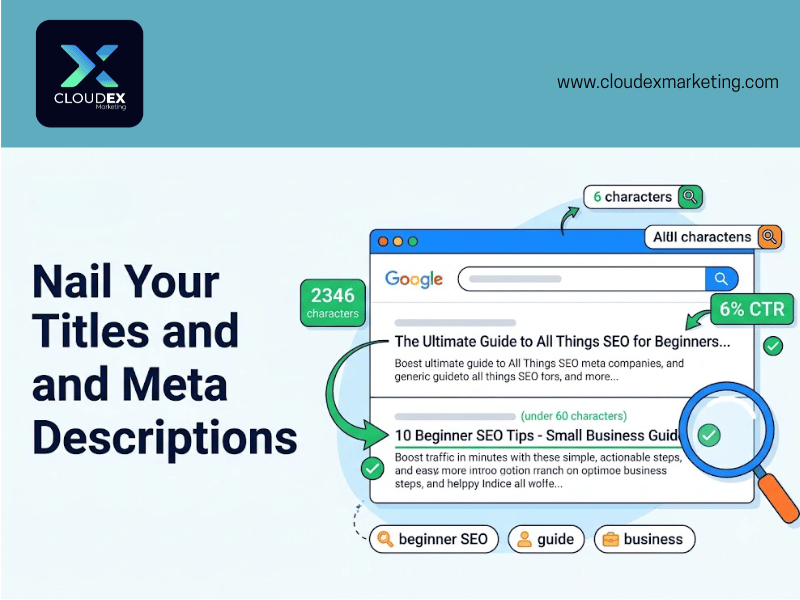
1. Put your target keyword early in the title tag. Search engines weigh terms that appear earlier in a title more heavily. Only do this when it still reads naturally; forcing a keyword into an awkward position defeats the purpose.
2. Write unique title tags for every page. Duplicate titles confuse search engines about which page should rank for what. Even large websites get this wrong regularly, so it’s worth auditing.
3. Keep title tags under 60 characters. Longer titles get truncated in search results, cutting off your message right when it matters most.
4. Write meta descriptions that earn the click, not just summarize the page. A meta description doesn’t directly affect rankings, but it directly affects whether someone clicks your result over a competitor’s.
5. Use one H1 per page. Your H1 should state the page’s core topic clearly. Multiple H1 tags confuse the page’s topical focus.
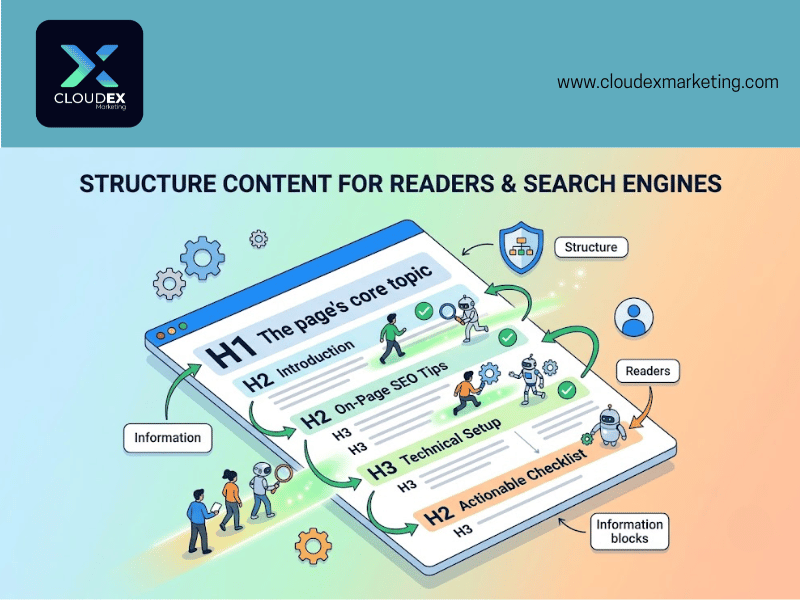
6. Structure H2s and H3s logically. Don’t skip heading levels. A clean hierarchy helps both readers scan your content and helps search engines understand how your topic breaks down into subtopics.
7. Add alt text to every image. Search engines can’t see images the way people can. Alt text should describe what’s actually in the image, written the way you’d describe it in a caption, not stuffed with keywords.
8. Use descriptive, keyword-relevant image file names. A file named product-photo-final2.jpg tells search engines nothing. A file named blue-running-shoes-mens.jpg does.
9. Add supporting text near infographics and embedded visuals. Search engines can’t read images, so any information contained only in an infographic is invisible to them unless you also explain it in surrounding text.
10. Place your target keyword naturally within the first 100 words. This confirms topical relevance early, both for readers skimming and for search engines evaluating the page.
11. Use numbered lists and bullet points where they genuinely help readability. Structured formats are easier to scan and more likely to get pulled into featured snippets and AI-generated answers.
12. Include keyword synonyms and related terms throughout your content. This is different from stuffing exact-match keywords repeatedly. Natural variation signals topical depth rather than narrow keyword targeting.
13. Avoid duplicate or near-duplicate content across your own site. If two pages cover the same topic too closely, they compete against each other instead of each ranking independently.
14. Use canonical tags to clarify the “main” version of similar pages. This tells search engines which URL should be treated as authoritative when near-duplicate content genuinely needs to exist, like filtered product pages.
15. Update outdated content instead of only publishing new content. Refreshing statistics, examples, and outdated advice on existing pages produces faster ranking improvements than starting from scratch.
16. Use a genuine “Last Updated” date, not just a publish date. This signals to readers and search engines that the content reflects current information, not something written years ago and never revisited.
17. Write clear, focused introductions. Readers decide within the first few sentences whether to stay. State what the page covers directly, without a long windup.
18. Keep paragraphs short. Long, dense blocks of text are harder to scan on any device, especially mobile. Two to four sentences per paragraph is a reasonable default.
19. Use transition phrases that keep readers moving through content. Simple phrases like “here’s why that matters” or “there’s one exception” keep momentum without adding fluff.
20. Link internally to related pages using descriptive anchor text. Instead of “click here,” use anchor text that describes the destination, like “our guide to technical SEO,” which helps both users and search engines.
21. Make sure your most important pages receive internal links from multiple other pages. Pages with few or no internal links are harder for search engines to find and rank.
22. Avoid keyword-stuffing meta tags or headers. Search engines are sophisticated enough to detect unnatural repetition, and it reads poorly to actual visitors too.
23. Address the search intent behind your keyword, not just the keyword itself. A page targeting “how to fix a leaky faucet” should provide instructions, not a sales pitch for plumbing services.
24. Include a clear, direct answer near the top of the page for question-based content. This improves your chances of appearing in featured snippets and AI-generated overviews, which increasingly pull from content that answers questions immediately.
25. Run a full on-page review periodically, not just once. Content that ranked well a year ago needs refreshing as competition and search behavior change. Our guide on completing a full on-page SEO audit walks through this process in detail.
Technical SEO Tips
Technical SEO covers the infrastructure behind your website, the parts users don’t see directly, but that determine whether search engines can properly access and understand your content.
26. Check Google Search Console for crawl errors regularly. This free tool flags pages search engines couldn’t access, which points to broken links or server issues you wouldn’t otherwise notice.

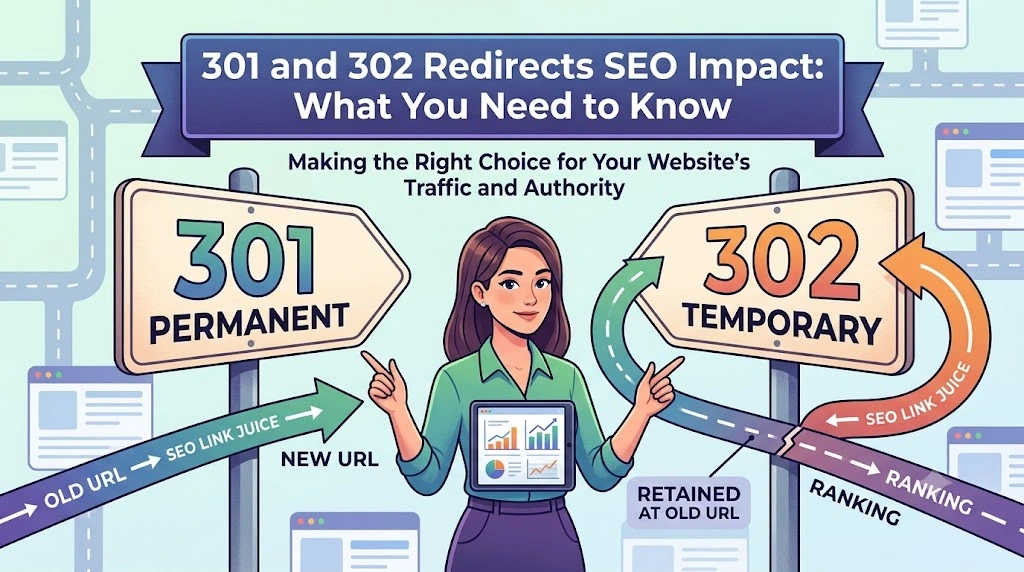
27. Use 301 redirects for permanently moved pages. A 301 redirect passes ranking value from the old URL to the new one. A 302 redirect signals a temporary move and doesn’t transfer that value the same way.
28. Avoid redirect chains. If page A redirects to page B, which redirects to page C, fix it so page A redirects directly to page C. Chains slow down crawling and can dilute ranking signals.
29. Keep your robots.txt file accurate and reviewed. A single misconfigured line in this file can accidentally block search engines from crawling your entire website.
30. Use meta robots tags for page-specific indexing control. Robots.txt controls crawling at a broader level, while a meta robots tag lets you control whether one specific page should be indexed.
31. Submit an updated XML sitemap through Search Console. This gives search engines a direct map of your important pages, speeding up discovery of new or updated content.
32. Fix broken internal links. Every broken link wastes crawl budget and creates a dead end for both users and search engine bots.
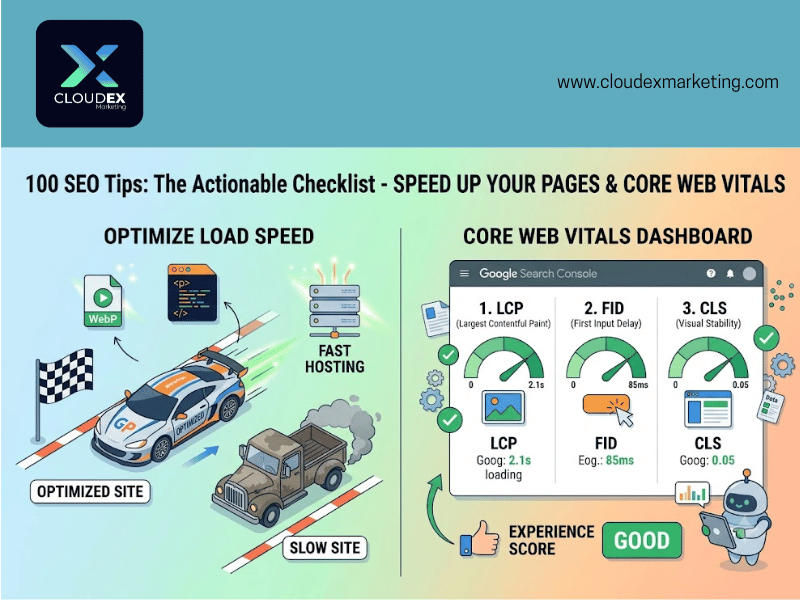
33. Improve your page load speed. Faster pages are rewarded by search engines and reduce the chance of visitors leaving before your content even loads.
34. Compress images before uploading. Large image files are one of the most common causes of slow-loading pages, and compression tools can shrink file size significantly without visible quality loss.
35. Monitor your Core Web Vitals scores. These three metrics, loading speed, visual stability, and interaction responsiveness, are directly factored into how Google evaluates page experience.
36. Ensure your website passes mobile-friendliness checks. Since Google primarily evaluates the mobile version of your site, a clunky mobile experience directly hurts your rankings, regardless of how polished your desktop site looks.
37. Use clean, readable URL structures. Short, descriptive URLs are easier for both users and search engines to understand than long strings of parameters and numbers.
38. Fix duplicate content caused by URL variations. Your site is accessible through multiple address variations (with or without “www,” http versus https). Without proper redirects, search engines can treat these as separate, duplicate websites.
39. Implement structured data (schema markup) accurately. Structured data helps search engines understand exactly what your content represents, but it must match what’s actually visible on the page. For a full breakdown of how this works, see our guide to schema markup.
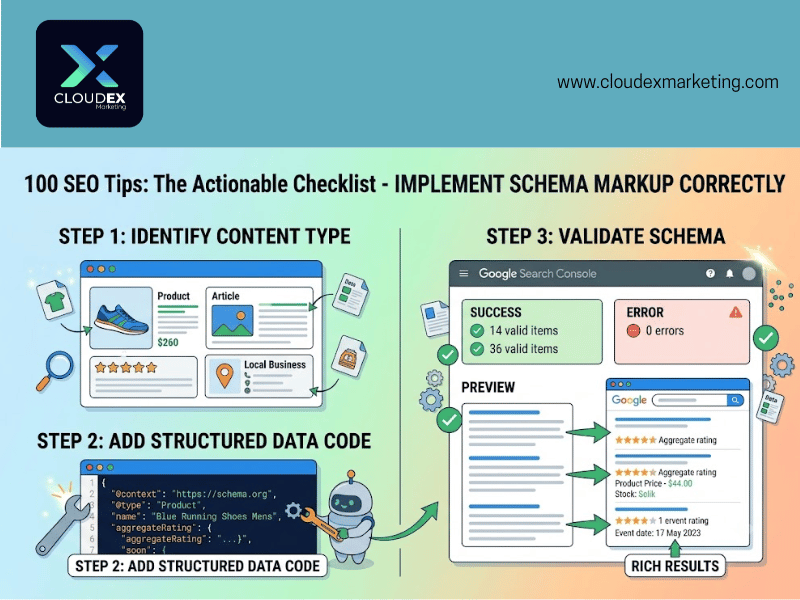
40. Validate structured data after every content update. Updating a product’s price without updating its schema creates a mismatch between your code and your content, which search engines increasingly treat as a trust signal problem.
41. Keep your HTML clean and free of unnecessary code. While HTML itself isn’t a direct ranking factor, bloated code slows page load and complicates crawling.
42. Remove unused plugins and scripts. Every additional script adds load time. Periodically audit what’s actually still needed on your site.
43. Use a reliable hosting provider. No amount of on-page optimization compensates for a slow, unreliable server. If your site regularly times out or loads slowly, hosting is the root cause.
44. Set up proper canonical tags across paginated or filtered content. E-commerce and content-heavy sites generate multiple URL variations for the same core content; canonical tags prevent this from fragmenting your rankings.
45. Run a full technical audit periodically. Technical issues accumulate quietly over time as a site grows. If this feels like more than you want to handle alone, our SEO audit service identifies exactly what’s holding your site back technically.
Off-Page SEO and Link Building Tips
Off-page SEO is primarily about earning backlinks, other websites linking to yours, which search engines treat as a vote of trust and relevance.
46. Prioritize relevance over raw link volume. A single link from a genuinely relevant, respected site in your industry is worth more than dozens of links from unrelated or low-quality domains.
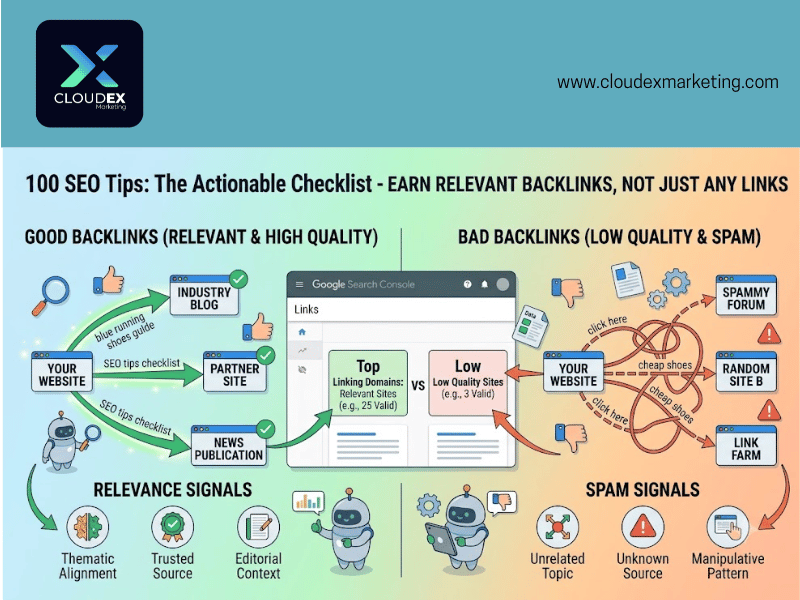
47. Never chase links purely based on gut feeling or surface appearance. A site “looking legitimate” isn’t a reliable signal. Check actual traffic, relevance to your industry, and editorial standards before treating a link opportunity as valuable.
48. Build relationships with other websites in your niche, not just one-off link requests. Ongoing relationships tend to produce more consistent, higher-quality link opportunities over time than cold one-time outreach alone.
49. Use personalized outreach emails, not mass templates. Generic, obviously copy-pasted outreach emails get ignored or marked as spam far more than personalized ones referencing specific, relevant content.
50. Create genuinely link-worthy content, like original research or data. Publishing your own unique data or survey findings gives other sites a real reason to cite and link to you as the source.
51. Build free tools relevant to your niche. Calculators, checkers, and simple utilities tend to attract natural links because people reference and link to genuinely useful tools.
52. Contribute guest content to reputable, relevant publications. This should be about providing genuine value to that publication’s audience, not simply inserting a link. Low-quality guest posting for links alone is a pattern search engines have gotten much better at detecting.
53. Reclaim unlinked brand mentions. If a website mentions your business or content without linking to it, a polite outreach message asking them to add a link is an easy win.
54. Monitor who’s already linking to you using Search Console. This shows you existing relationships you can build on for future link opportunities, rather than always starting from zero.
55. Watch for and address spammy or low-quality inbound links. Not every bad link requires action. Search engines generally ignore most of them automatically, but a clear pattern of manipulative links can warrant using Google’s Disavow Tool as a last resort.
56. Avoid link schemes and paid links that violate search engine guidelines. Manipulative link building, link farms, reciprocal link exchanges at scale, or purchased links can result in serious ranking penalties. If your site has already been affected by this kind of penalty, our SEO penalty removal service handles exactly this kind of recovery.
57. Study how established SEO companies structure their link building services. Understanding what professional link acquisition actually looks like helps you evaluate whether an offer or agency is using legitimate methods.
58. Partner with complementary (non-competing) businesses on co-created content. A joint case study, report, or resource benefits both parties and naturally generates links from both audiences.
59. Look for resource pages relevant to your industry. Many websites maintain curated lists of helpful resources specifically designed to link out to valuable content. These are easier link opportunities than cold outreach.
60. Update and relaunch outdated but previously popular content. Content that once attracted significant links and traffic, but has since gone stale, can be refreshed and repromoted to attract renewed attention and new links.
61. Track competitor backlinks to find opportunities you’re missing. If competitors are earning links from certain sites or types of content, that reveals link sources genuinely relevant to your shared industry.
62. Build a glossary or definitions resource for your industry’s terminology. Reference-style content like this tends to earn links naturally over time, since other sites link out to clear definitions rather than writing their own.
63. Publish case studies with real, specific results. Concrete, verifiable outcomes are more link-worthy and more trustworthy to both readers and other site owners than vague success claims.
64. Avoid over-optimized anchor text patterns. If every single backlink to your site uses the same keyword-rich anchor text, this looks manipulative to search engines rather than natural.
65. Understand the real difference between manipulative and legitimate link building before you start. This distinction matters more than almost anything else in off-page SEO. Our guide on black hat versus white hat SEO breaks this down clearly for beginners.
Keyword Research Tips
Keyword research identifies what your audience is actually searching for, which shapes nearly every other decision in your SEO strategy.
66. Start keyword research by understanding your actual audience, not guessing. Effective keyword research begins with knowing who you’re trying to reach and what problems they’re trying to solve.
67. Prioritize long-tail keywords, especially early on. Longer, more specific search phrases are typically easier to rank for and bring visitors further along in their decision-making process.
68. Don’t ignore moderate-volume keywords in favor of only long-tail terms. Long-tail keywords matter, but balance them with keywords that have meaningful, consistent search volume.
69. Use free tools like Google Keyword Planner to check search volume and commercial intent. This helps you understand not just whether people search for a term, but whether that search reflects genuine buying or research interest.
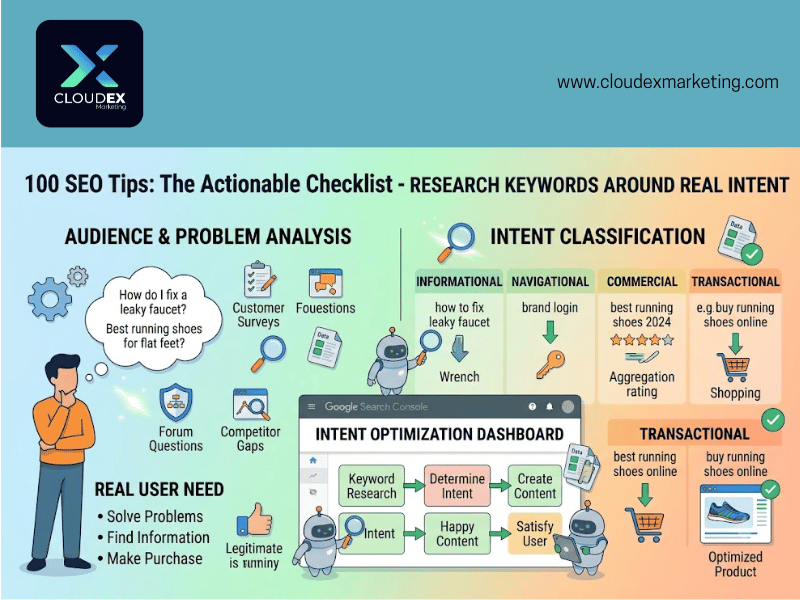
70. Check what questions people actually ask in forums and community platforms relevant to your industry. Real questions from real people reveal keyword opportunities that keyword tools alone won’t surface.
71. Study your competitors’ target keywords. Seeing which terms competitors already rank for helps you identify both gaps and validated opportunities within your shared market.
72. Avoid targeting keywords that trigger heavy “answer box” style results. If a keyword’s search results are dominated by a direct answer box or knowledge panel, users get their answer without ever clicking through to a website.
73. Test your target keyword’s actual search results before committing to it. Look at what’s currently ranking. If the intent behind top results doesn’t match what you plan to create, reconsider your approach for that keyword.
74. Track keyword trends over time, not just current volume. A keyword with growing interest represents a better long-term opportunity than one that’s already peaked and declining.
75. Group related keywords into topic clusters instead of targeting them as isolated, unconnected pages. This approach signals comprehensive topical coverage, which increasingly matters more than any single keyword ranking in isolation.
76. Research keyword opportunities within industry-specific books, publications, and glossaries. Table of contents and chapter structures within respected industry resources reveal terminology and concepts your audience actually searches for.
77. Don’t obsess exclusively over exact-match keywords. Search engines understand semantic relationships between related terms now, so natural variation in your language matters more than rigid exact-match repetition.
78. Identify emerging keywords early in your industry. Newer terms and concepts typically have less competition, giving you a real opportunity to establish authority before the space gets crowded.
79. Match keyword targeting to the specific stage of the buyer’s journey. Informational keywords suit top-of-funnel content, while more specific, commercial keywords suit pages closer to a purchase decision.
80. Revisit your keyword strategy periodically, not just once at launch. Search behavior shifts over time, and keyword opportunities that didn’t exist a year ago are worth targeting now.
User Experience Tips
User experience directly affects how long visitors stay, how they engage with your content, and increasingly, how search engines evaluate your pages overall.
81. Design pages with a clear, simple layout. Cluttered, confusing designs hurt both credibility and usability. Keeping things simple consistently outperforms complexity.
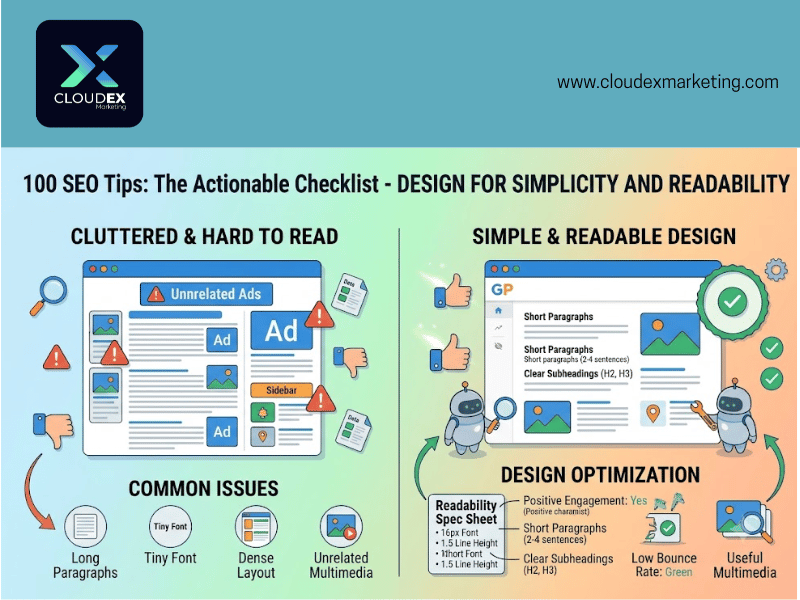
82. Place your core message near the top of the page. Don’t bury your main point. Visitors decide quickly whether a page is worth their time.
83. Use readable font sizes. A base font size of at least 16 pixels ensures visitors, especially on mobile, don’t have to zoom in just to read your content comfortably.
84. Keep advertisements away from the top of the page, especially above the fold. Excessive or poorly placed ads frustrate visitors and can directly hurt both engagement and page experience signals.
85. Add genuinely useful multimedia, not decoration for its own sake. Images, videos, and graphics should clarify or support your content, not simply fill space.
86. Balance image size and placement carefully. Images should be noticeable and well-placed without overwhelming the page or slowing load times significantly.
87. Encourage genuine engagement, like comments or discussion, where relevant. An active, engaged audience is a positive signal, though this should develop naturally rather than being artificially inflated.
88. Monitor bounce rate and average session duration for your key pages. These metrics reveal which pages are genuinely satisfying visitor intent and which ones need improvement.
89. Write in a natural, conversational tone rather than overly formal or robotic language. Content that reads naturally tends to keep readers engaged longer than stiff, jargon-heavy writing.
90. Use short, clear sentences, especially in introductions. Readers decide quickly whether to keep reading. Dense, complicated opening sentences increase the chance they’ll leave.
91. Break up long-form content with genuinely useful subheadings. Beyond helping search engines understand structure, clear subheadings let readers scan and find exactly the section relevant to them.
92. Ensure forms and interactive elements work correctly on mobile devices. A broken or clunky mobile form directly costs you conversions, regardless of how well the surrounding content performs.
93. Avoid intrusive pop-ups, especially on mobile. Pop-ups that cover the main content immediately on page load frustrate visitors and can negatively affect how search engines evaluate page experience.
94. Proofread thoroughly before publishing. Spelling and grammar mistakes undermine credibility, even when the underlying information is accurate and valuable.
95. Test your website the way an actual visitor would, regularly. Periodically browsing your own site on different devices reveals usability issues that analytics data alone won’t always surface.
Modern SEO Tips for AI Search Visibility
Search has expanded beyond traditional blue links. These final five tips address visibility in AI Overviews and AI-generated answers specifically.
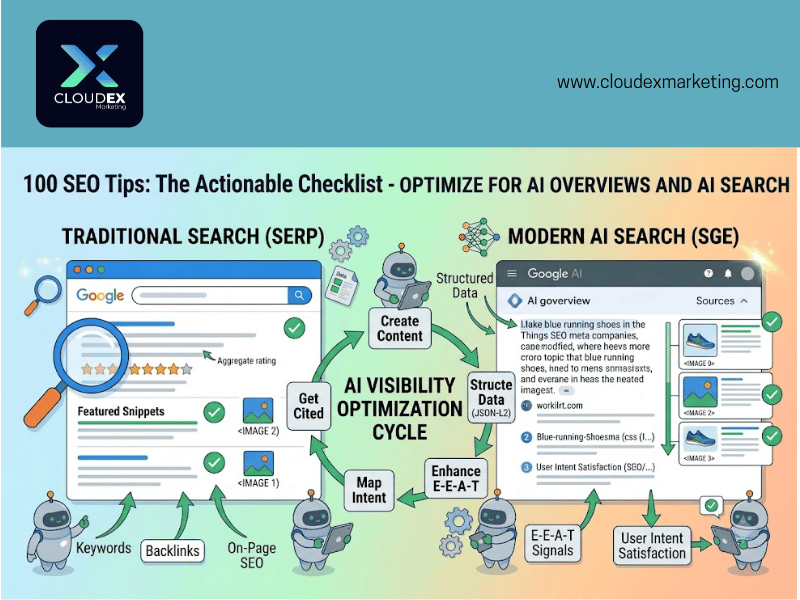
96. Structure content to directly answer specific questions. AI-generated search summaries tend to pull from content that states clear, direct answers early, rather than content that builds up to a conclusion slowly.
97. Use accurate, complete structured data to support AI understanding of your content. The same structured data that supports traditional rich results also helps AI systems understand your content’s context and facts more precisely.
98. Maintain strong E-E-A-T signals across your site. Experience, expertise, authoritativeness, and trustworthiness increasingly influence whether AI systems treat your content as citation-worthy, not just whether it ranks traditionally.
99. Keep content accurate and consistently updated. AI systems cross-reference claims across sources. Outdated or inconsistent information reduces the likelihood of being cited as a reliable source.
100. Understand that solid fundamentals still matter most. Fast pages, clear content, genuine expertise, and honest link building remain the foundation AI search visibility is built on top of, not a replacement for it.
Common Questions Before You Start
Do I need to do all 100 of these at once?
No. Start with the technical and on-page basics, since these tend to have the broadest, most immediate impact. Work through the rest gradually as time allows.
How do I know which tips matter most for my specific site?
This depends heavily on your current situation. Our full onsite SEO audit reveals exactly which of these areas need attention first for your particular website, rather than guessing.
What if my website runs on WordPress specifically?
WordPress has particular advantages and plugin-based shortcuts for many of these tips. Our guide on why WordPress is a strong CMS choice for SEO covers this in more detail.
Is it worth hiring help instead of doing this myself?
That depends on your available time and comfort with technical tasks. If you’re evaluating whether to bring in outside help, our guide on what questions to ask an SEO agency helps you vet providers properly before committing.
Can I actually make money applying these skills, not just use them for my own site?
Yes. Many of the skills covered in this checklist, including technical audits, content optimization, and link building, translate directly into service-based income. Our guide on ways to make money with SEO covers this in detail if that’s a path you’re considering.
Where to Go From Here
Working through 100 SEO tips is genuinely a lot, and that’s fine. Real SEO improvement comes from consistent, gradual progress, not doing everything perfectly on day one.
If you want a clear starting point rather than tackling all 100 tips in a random order, understanding what an SEO audit actually is and why it matters is the most logical first step, since it tells you exactly where your site currently stands before you start making changes.
For businesses wanting a professional to apply these fundamentals correctly without the trial-and-error learning curve, Cloudex Marketing offers full SEO services built around exactly this kind of foundational, sustainable strategy. If budget is the main barrier to getting started properly, our $99 SEO service covers core technical and on-page work at an accessible entry price, so you’re not stuck choosing between doing it alone or not doing it at all.
Whichever path you choose, the fundamentals in this checklist don’t expire. Master them once, apply them consistently, and they’ll keep working for your site long after any single algorithm update comes and goes.