


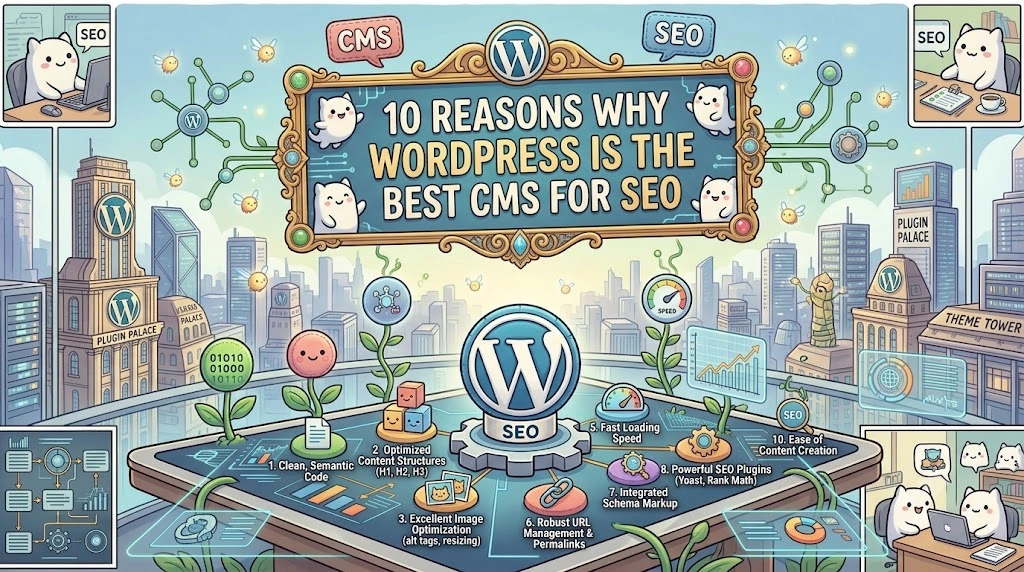
Choosing the right platform determines whether your SEO efforts compound or collapse. This breakdown of 10 reasons why WordPress is the best CMS for SEO shows exactly why over a third of the internet runs on it, and why that share keeps growing every year.
WordPress isn’t popular by accident. For business owners choosing between platforms, that adoption rate signals something important: WordPress solves SEO problems other CMS platforms still struggle with.
Here are the 10 specific reasons why WordPress is the best CMS for SEO and consistently outperforms alternative platforms for search visibility.
1. WordPress Prioritizes User Experience by Default
WordPress themes and plugins work together to create fast, professional, and genuinely usable websites without requiring custom development from scratch. This matters because Google’s ranking algorithms increasingly weight user engagement signals, including time on page, bounce rate, and return visits, as proxies for content quality.
Visitors who land on a well-built WordPress site tend to stay longer simply because the experience doesn’t fight them. Clean navigation, readable typography, and responsive layouts come standard with most reputable WordPress themes, not as expensive add-ons.
This creates a direct SEO advantage. Google’s Helpful Content system explicitly rewards sites that demonstrate strong user satisfaction signals. A platform that makes good UX the default, rather than an upgrade, removes one of the biggest technical barriers standing between a website and its first-page ranking.
If your current WordPress site isn’t delivering that experience, the theme or underlying architecture is usually the problem, not WordPress itself. A technical SEO audit identifies exactly which structural elements are dragging down engagement metrics.
2. WordPress Makes Clean, Keyword-Rich Permalinks Effortless
Permalink structure is one of those unglamorous technical details that quietly affects rankings for years. WordPress lets you edit every URL slug directly, replacing default strings full of numbers and query parameters with clean, readable paths.
Instead of a URL like yoursite.com/?p=1234, WordPress gives you yoursite.com/wordpress-seo-guide, a structure that immediately tells both users and search engines what the page covers. This single feature eliminates one of the most common technical SEO issues found on custom-built or legacy CMS platforms.
Keyword placement in the URL still carries measurable relevance weight in how search engines parse page topics. WordPress makes this a five-second edit rather than a developer request, which matters enormously for teams publishing content regularly without technical support on standby.
3. WordPress Simplifies Metadata Management for Every Page
Metadata, including page titles, meta descriptions, and structured markup, tells search engines exactly what a page is about before they even crawl the full content. Poor metadata management is one of the most common reasons that make technically sound websites underperform in search results.
WordPress solves this through plugins like Yoast SEO and Rank Math, which add metadata fields directly to the post editor. Every page, post, and product gets a dedicated space for title tags and meta descriptions, without touching a single line of code.
This accessibility matters because metadata isn’t a “set once and forget” task. It needs regular refinement as search intent shifts and competition changes. Platforms that require developer intervention for every metadata update create a bottleneck that most businesses stop maintaining after the first few months.
4. Image SEO Optimization Requires Zero Technical Skill
Images do more than break up long blocks of text. They’re a genuine ranking factor, and WordPress makes optimizing them remarkably straightforward.
Three specific capabilities stand out here.
- First, WordPress lets you add alt text to every image directly in the media uploader, giving search engines a text description of visual content they can’t otherwise interpret.
- Second, several plugins automatically generate alt text at scale for sites with large image libraries.
- Third, built-in and plugin-based compression tools resize images automatically, preventing the page-speed penalties that oversized images typically cause.
Compare this to platforms where image optimization requires manual file editing before upload, and the difference in practical SEO maintenance becomes obvious. WordPress removes the friction between “knowing you should optimize images” and actually doing it consistently, but knowing what makes alt text actually effective (not just present) is where most sites still leave ranking potential on the table.
5. WordPress Sites Load Fast When Built Correctly
Page speed is a confirmed Google ranking factor, particularly for mobile search results. A slow site doesn’t just frustrate visitors. It actively suppresses rankings regardless of how strong the underlying content is.
WordPress’s plugin ecosystem addresses this directly. Tools like WP Rocket and ShortPixel handle image compression, database optimization, and caching without requiring server-level configuration knowledge. These plugins compress bloated media files, clear unnecessary database clutter, and cache pages so repeat visitors load content almost instantly.
The caveat worth stating plainly: WordPress speed depends heavily on hosting quality, theme bloat, and plugin management. A poorly maintained WordPress site can be just as slow as a poorly built site on any other platform. The advantage isn’t automatic speed. It’s the accessibility of the tools needed to fix speed issues without hiring a full development team. For businesses running a heavier or older WordPress installation, technical SEO services typically resolve these bottlenecks faster than trial-and-error plugin testing.
6. WordPress Themes Come Mobile-Optimized From the Start
Mobile traffic has grown dramatically over the past several years, with mobile now accounting for the majority of web traffic across most industries. Google’s mobile-first indexing means your site’s mobile version, not its desktop version, is what actually gets crawled and ranked.
Most modern WordPress themes ship with responsive design built in, meaning your site automatically adjusts to phone and tablet screens without separate mobile development. This removes what used to be a significant technical SEO hurdle: maintaining two versions of the same site.
For businesses evaluating whether their current site meets mobile-first standards, this is worth checking directly rather than assuming. Older WordPress installations sometimes run outdated themes that predate proper responsive design, and even some custom-built sites still lack it entirely.
7. WordPress Connects Content Directly to Social Distribution
Social signals don’t directly determine rankings the way backlinks or on-page content do, but social distribution drives the traffic, engagement, and link discovery that indirectly support SEO performance.
WordPress makes this connection simple. Built-in and plugin-based social sharing buttons let readers distribute content with one click. Social feed integrations display live social content directly on your site, and several tools allow automated cross-posting when new content publishes.
The practical effect: content that’s easy to share gets shared more, and content that gets shared more reaches more potential linkers, more potential customers, and more repeat visitors. WordPress removes the friction from this distribution loop rather than requiring separate integration work for every social platform.
8. WordPress’s SEO Plugin Ecosystem Has No Real Competitor
This is arguably WordPress’s single biggest SEO advantage. No other CMS has an SEO plugin ecosystem this mature, this widely adopted, or this specifically engineered for search optimization.
Three plugins illustrate this depth. Yoast SEO, with millions of active installations, handles keyword optimization guidance, readability analysis, and metadata templating in one interface accessible to non-technical users. Google XML Sitemaps automatically generates and updates sitemaps, then notifies search engines whenever new content is published, removing manual submission entirely. Google Analytics integrations (like MonsterInsights) bring traffic and engagement data directly into the WordPress dashboard, so tracking performance doesn’t require switching platforms constantly.
The broader point matters more than any single plugin: WordPress users get access to continuously updated, purpose-built SEO tools without touching code. Platforms with smaller plugin ecosystems force a choice between hiring developers for every optimization task or leaving SEO opportunities unaddressed.
9. WordPress Integrates Seamlessly With the Broader Marketing Stack
SEO doesn’t happen in isolation. It works alongside email marketing, analytics, security monitoring, and a dozen other tools that together determine whether a website actually converts the traffic it earns.
WordPress’s plugin architecture was built for this kind of integration from the ground up. Email marketing platforms, security services like Sucuri, form builders, CRM connections, and productivity suites all connect to WordPress with minimal configuration. This isn’t unique to any single tool category. It’s a structural characteristic of how WordPress’s plugin API was designed.
For businesses running multiple marketing tools simultaneously, this integration depth reduces the technical overhead of keeping every system synchronized. A CMS that fights against third-party integration ultimately costs more in development time than it saves in platform simplicity, regardless of how the pricing looks upfront.
10. WordPress Themes Are Engineered With SEO-Friendly Code Structure
Keywords and metadata are only part of what search engines evaluate. Page structure, semantic HTML, and code cleanliness all factor into how easily search engines can crawl and interpret a page.
Reputable WordPress themes are built with these standards in mind from the start, using proper heading hierarchy, semantic HTML5 elements, and clean underlying code that doesn’t bury content behind unnecessary scripts or bloated frameworks. Choosing a well-coded, SEO-conscious theme handles a significant portion of technical SEO automatically, without requiring manual code audits.
This is precisely where quality varies most between WordPress installations. Free or poorly maintained themes can undo every other advantage on this list through bloated code and unnecessary render-blocking scripts.
Working with developers who understand WordPress development services specifically for SEO performance (not just visual design) determines whether a site captures WordPress’s full technical advantage or quietly undermines it.
The Honest Caveat: WordPress Isn’t Automatically Optimized
None of these 10 advantages activate automatically. WordPress provides the infrastructure and accessibility for strong SEO; it doesn’t execute the strategy for you. A poorly configured WordPress site with bloated plugins, an unoptimized theme, and no metadata management will underperform a lean, well-built site on any platform.
This is the distinction the best SEO company partners understand and less experienced providers miss entirely. Platform choice creates opportunity. Execution determines whether that opportunity translates into rankings, traffic, and revenue.
For businesses building a new site from the ground up rather than working within an existing template, custom website development built specifically around SEO architecture from day one avoids the retrofitting problems that plague sites optimized as an afterthought.
Why This Matters for Your Business Right Now
Choosing WordPress solves the platform-level SEO problem. It doesn’t solve the strategy-level problem, knowing which keywords to target, how to structure topical authority, or how to build the kind of link profile that survives algorithm updates.
That’s where working with genuine SEO experts rather than generalist web developers makes the measurable difference. A top SEO agency understands that WordPress’s technical advantages only compound when paired with an entity-first content strategy, not isolated keyword targeting page by page.
This extends specifically to how backlinks get built. Modern search engines evaluate link relevance contextually, which is why advanced link SEO strategies now focus on topical alignment between linking and linked pages rather than raw link volume. A WordPress site with excellent technical foundations still underperforms if its backlink profile was built using outdated, volume-based tactics instead of advanced link SEO approaches that prioritize contextual authority.
This is also why pricing shouldn’t be the only factor when selecting a provider. Affordable SEO services exist at every quality tier, but the cheapest option skips the technical foundation work, proper WordPress configuration, clean theme architecture, and structured metadata that makes every subsequent SEO effort more effective. Paying slightly more for a provider who gets the WordPress foundation right the first time typically costs less than paying twice: once for a rushed setup, and again to fix it later.
The Bottom Line
WordPress earned its 41.5% to 42.6% market share by powering up 472 million to 595 million websites, solving real, persistent SEO problems that other platforms still struggle with: permalink structure, metadata accessibility, plugin depth, and mobile responsiveness, among others covered here.
That’s not marketing hype; it’s a direct function of how the platform’s architecture was designed from its earliest versions onward.
But a platform is only as good as the strategy built on top of it. WordPress gives you the tools. Whether those tools translate into rankings depends on technical execution, content strategy, and link-building approach. At Cloudex Marketing, we make it work altogether as one coherent system rather than three disconnected checkboxes.
Ready to find out if your WordPress site is capturing its full SEO potential?
Get a comprehensive SEO audit that evaluates your technical foundation, content structure, and backlink profile, then builds a strategy around what your WordPress site is actually capable of ranking for.