
What Is Schema Markup?
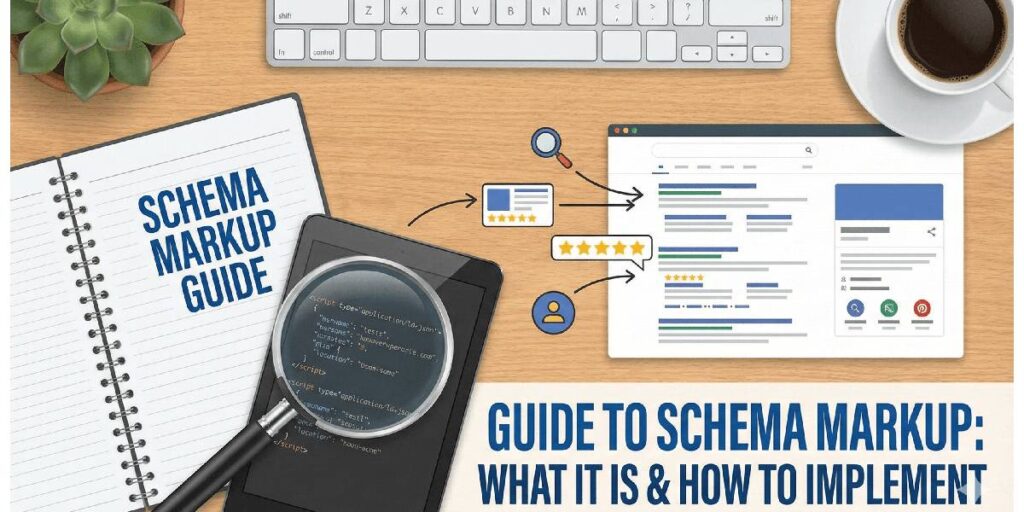
Schema Markup or structured data markup is a form of structured data that acts as a standardized code for search engines. While often viewed merely as a technical script, it functions fundamentally as an entity layer. This layer helps search engines understand the specific relationships between concepts, objects, and facts on a webpage, rather than just reading the text.
It allows developers, SEOs, and business owners, not just content writers, to explicitly define what a page is about, transforming ambiguous text into clear entities like products, events, or reviews.
What does Vocabulary actually mean in Schema Markup?
At its core, Schema Markup is governed by Schema.org, which is described as the vocabulary provider. But what does that actually mean?
Think of this vocabulary as a universal dictionary that search engines (like Google and Bing) have agreed to use.
The Problem:
- Humans use many different words to describe the same thing. You might call your business a “shop,” a “store,” or a “boutique.” This variety confuses search bots.
The Solution:
- The Schema vocabulary provides one specific code word (like LocalBusiness) that every search engine understands perfectly.
When you use this vocabulary, you are no longer relying on Google to guess what your words mean; you are telling it exactly which definition from the “dictionary” applies to your content.
The Core Ecosystem
To understand Schema Markup, one must recognize the relationships defined in the entity graph:
- Schema.org: The vocabulary provider.
- Structured Data: The parent concept and the actual format used to implement the markup.
- Search Engines (Google): The primary interpreter and consumer of this data.
- SERP / Rich Results: The visual output is enabled by correct implementation.
Unlike traditional SEO, which often focuses on keywords, Schema Markup focuses on entity understanding. It serves as a communication layer that facilitates the transfer of knowledge from a website to a search engine’s Knowledge Graph.
Lexical Relations: How Search Engines “Read” Schema
To master Semantic SEO, you must stop thinking in keywords and start thinking in Lexical Paths. Search engines do not just read data; they trace relationships.
When Google analyzes your Schema, it follows a specific “conceptual path” to understand the context. Below is the Lexical Map of how these concepts connect in the algorithm’s brain.
The Core Lexical Paths
These are the specific relationships (Predicates) that define the Schema Markup universe. We use these paths to establish Topical Authority.
1. The Identity Path (Is-a)
- Schema Markup > Is-a > Structured Data > Is-a > SEO Concept
- This establishes the Class. It tells the engine that “Schema” is not a product or a person, but a methodology nested under Structured Data.
2. The Authority Path (Governed-by)
- Schema Markup > Governed-by > Schema.org > Governed-by > W3C
- This establishes Standardization. It signals that your code isn’t random; it adheres to a global vocabulary managed by an authoritative entity (Schema.org).
3. The Functionality Path (Enables)
- Schema Markup > Enables > Rich Results > Improves > CTR
- This establishes Value. It clarifies that Schema does not directly cause “Rankings” (a common misconception); rather, it enables a visual feature (Rich Result) which improves a behavioral metric (Click-Through Rate).
4. The Implementation Path (Implemented-as)
- Structured Data > Implemented-as > JSON-LD > Consumed-by > Google AI
- This establishes the Format. It prioritizes JSON-LD over legacy formats like Microdata, creating a direct line of communication to Google’s rendering engine.
Why This Matters for AI Search
In the era of Entity-Based SEO, AI systems (like Google Gemini, Grok, Claude, ChatGPT, and more) consume these paths to form answers.
| Old Way (Keywords) | New Way (Lexical Relations) |
| Putting “Schema” and “SEO” on a page 10 times. | Explicitly coding the relationship that Review Schema is-a type of Structured Data that validates Social Proof. |
By respecting these lexical paths, you are not just writing code; you are building a Semantic Bridge that allows search engines to traverse from your content to the Knowledge Graph with zero friction.
How Schema Markup Works (Search Engines & AI)
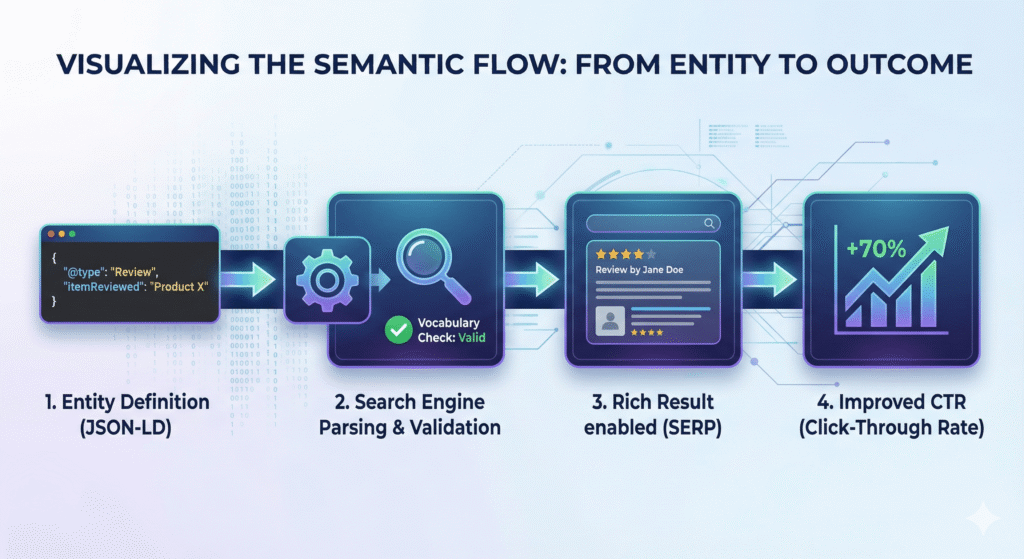
Schema Markup works by translating human-readable content into machine-readable code. This process reduces ambiguity for search engines, moving the interpretation process from “guessing” to “parsing” specific entities.
The Technical Implementation Layers
Schema markup operates through specific formats. The technical implementation entities include:
- JSON-LD (JavaScript Object Notation for Linked Data): This is the preferred format for Google and modern SEO. It allows for clean code injection without disrupting the HTML structure.
- Microdata: A legacy format that is embedded directly within HTML tags.
- RDFa: RDFa stands for Resource Description Framework in Attributes. An alternative format, though less common in modern “Beginner to Practical” workflows.
When a search engine crawls a page, it consumes the structured data, validates it against the Schema.org vocabulary, and determines eligibility for enhanced visibility features known as Rich Results.
Why Schema Markup Matters for SEO
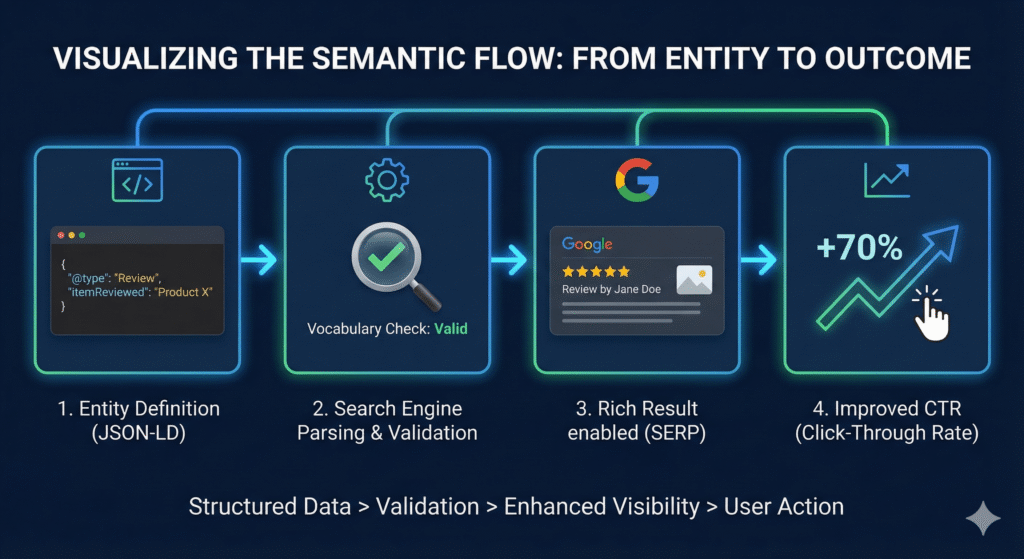
A common misconception is that Schema Markup is a direct ranking factor. However, semantic analysis reveals that Schema primarily improves visibility, Click-Through Rate (CTR), and User Experience, rather than rankings alone.
Key Benefits
- Rich Results Eligibility: Schema markup is the mechanism that triggers visual enhancements in the SERP, such as star ratings, images, and event times.
- Improved CTR: By providing rich snippets, pages become more attractive to users, directly influencing behavioural metrics like CTR.
- Entity Disambiguation: It clarifies the meaning of content, helping search engines distinguish between identical terms (e.g., “Apple” the fruit vs. “Apple” the company).
- Future-Proofing: It prepares content for AI comprehension and Voice Search, which rely heavily on structured entities.
Reducing “Interaction Cost” (UX Benefits)
Schema Markup is not just for bots; it significantly upgrades the User Experience (UX) by reducing the effort required to find answers. In Information Retrieval theory, this is called reducing the “Interaction Cost.”
Pre-Click Decision Making:
A user sees the star rating, price, and stock status directly on the SERP. They don’t have to click, wait for the page to load, and scroll to find the price. They know instantly if your result matches their intent.
Visual Cues:
Features like “Recipe Cards” or “Event Dates” provide a visual interface that is easier for the human brain to process than a wall of text.
Outcome:
Users who click on a Rich Result are essentially “pre-qualified.” They already know the key details, meaning they are less likely to “Bounce” (leave immediately) and more likely to convert.
Types of Schema Markup (The Sub-Entities)
Different types of content require specific schema subtypes. The dominant entity types found in high-ranking educational guides include:
Common Schema Types
- FAQ Schema: Used for pages containing Frequently Asked Questions. It is a common subtype for capturing “People Also Ask” coverage in SERPs.
- Product Schema: Essential for e-commerce. It includes attributes like price, availability, and rating.
- Review Schema: Adds star ratings to search results, heavily impacting CTR.
- LocalBusiness Schema: Critical for Local SEO. It defines physical location, opening hours, and contact info.
- Recipe Schema: Enhances cooking content with visual cards showing prep time, calories, and images.
- Event Schema: Provides time-based entity visibility for concerts, webinars, or festivals.
Which Schema Should You Use? (The Decision Matrix)
Don’t guess. Use this logical framework to determine the primary entity of your page. Google prefers specific subtypes over broad ones.
- If the page sells a physical item: > Use Product
- If the page represents a physical store/office: > Use LocalBusiness (or specific subtype like Restaurant, Dentist).
- If the page answers a list of questions: > Use FAQPage
- If the page promotes a time-based gathering: > Use Event
- If the page teaches “How-to” do something: > Use HowTo
- If the page is a standard blog post: > Use Article or BlogPosting
- If the page is the Homepage: > Use Organization or ProfessionalService
How to Implement Schema Markup (Step-by-Step)
The dominant “Instructional Guidance Frame” in SERPs suggests that a complete guide must satisfy both learning and doing.
Implementation typically follows a “Beginner > Intermediate > Practical” flow.
Step 1: Generate the Markup
You do not need to write code from scratch. Tools are central to this process:
- Schema Generator: Tools used to create the specific JSON-LD markup without coding knowledge.
Step 2: Choose the Format
Always prioritize JSON-LD as it is the preferred format over Microdata.
Step 3: Deployment Methods
- Manual HTML Injection: Copying the JSON-LD script into the <head> or <body> of your webpage.
- CMS Integration: Using plugins (like standard WordPress SEO plugins) to automatically generate schema for pages.
Step 4: Validation
Before publishing, the code must be tested to ensure there are no syntax errors that would prevent Google from reading it.
Automated Implementation (WordPress & CMS)
For non-developers, manually writing JSON-LD can be risky. If you are using a CMS like WordPress, you can automate the Ontology Construction using “Entity-Aware” plugins.
The “Plugin” Method
Instead of injecting code, you configure settings. Tools like RankMath or Yoast SEO act as intermediaries. They provide a user-friendly interface to input your data (Attributes), and they automatically generate the valid JSON-LD (Format) in the background.
- Global Schema: You set this once (e.g., Organization Name, Logo, Social Profiles). The plugin pushes this to every page.
- Contextual Schema: On individual posts, you can select specific types (e.g., change a “Post” to a “Recipe” or “Product”) using the plugin’s meta box.
Plugins are convenient but often generate “generic” schema. They might list you as a broad Organization instead of a specific ProfessionalService.
Always use the Schema Validator to check if the plugin is being specific enough. If the plugin limits you, you may need to use a “Header & Footer Code” plugin to manually inject custom JSON-LD for high-value pages.
Schema Markup Examples (JSON-LD)
Example: FAQ Schema
This markup tells Google that the page contains questions and answers, making it eligible for FAQ rich results.
JSON
<script type="application/ld+json">

{

"@context": "https://schema.org",

"@type": "FAQPage",

"mainEntity": [{

"@type": "Question",

"name": "What is Schema Markup?",

"acceptedAnswer": {

"@type": "Answer",

"text": "Schema markup is code that helps search engines understand your content and better represent it in search results."

          }

    }]

}

</script>
Example: LocalBusiness Schema
This connects a business entity to a physical location in the Knowledge Graph.
JSON
<script type="application/ld+json">

{

"@context": "https://schema.org",

"@type": "LocalBusiness",

"name": "Example Business",

"address": {

"@type": "PostalAddress",

"streetAddress": "123 Main St",

"addressLocality": "CityName",

"addressRegion": "State",

"postalCode": "10001"

      }

}

</script>
Ontology
If Schema Markup is the “Vocabulary” (the words we use), then Ontology is the “Grammar” (the rules of how those words relate to each other).
In Semantic SEO, an Ontology is a map of logic. It doesn’t just tell Google “This is a car.” It tells Google “This Car hasType SUV, usesFuel Electric, and isManufacturedBy Tesla.” It turns isolated facts into a connected web of knowledge.
When we implement Schema, we are essentially building a mini-ontology for your website that plugs into Google’s massive Global Knowledge Graph. Here is a breakdown of the core relationships (predicates) that define this model:
Core Identity & Entity Reconciliation
1. @type: ProfessionalService
- What It Is: Think of this as the “Species Classification” of your business. It tells Google broadly what kind of entity you are—specifically, that you sell expertise, not physical products on a shelf.
- Best Practice: Drill down to the most specific category possible. Do not just use Organization (too broad) or LocalBusiness (vague).
- Example: If you are a lawyer, use Attorney. If you are a plumber, use Plumber. For an SEO Agency, ProfessionalService is the gold standard.
- Strategic Value: Categorical Relevance. It ensures Google compares you against the right competitors. If you are labelled generic Organization, you might struggle to rank for “services near me” because Google isn’t 100% sure you serve customers locally.
2. @id: https://cloudexmarketing.com/#organization
- What It Is: This is your “Digital Fingerprint” or ID card. In the code world, URLs can change, but an @id stays constant. It tells Google, “Whenever you see this ID, we are talking about the same company.”
- Best Practice: Use your homepage URL followed by a specific hashtag like #organization or #identity.
- Example: https://yourdomain.com/#business
- Strategic Value: Entity Disambiguation. It prevents “Identity Splintering.” Without this, Google might think “Cloudex Marketing” on Facebook and “Cloudex” on the website are two different entities. This ties them together into one solid profile.
3. sameAs (Social Media Profiles)
- What It Is: This is the “Identity Verification” list. It tells Google, “These social media profiles belong to us.” It confirms that the entity on your website is the same one tweeting on X or posting on LinkedIn.
- Best Practice: Include every verified and active profile you own (LinkedIn, X, Facebook, Pinterest).
- Strategic Value: Knowledge Graph Construction. This is how you get a Knowledge Panel (the information box on the right side of Google). The more connections you provide, the easier it is for Google to “connect the dots” and trust your brand.
4. sameAs (Authority Citations)
- What It Is: This is “Digital Endorsement.” It links your brand to trusted third-party databases, like Crunchbase, Wikipedia, or industry directories (e.g., TechBehemoths).
- Best Practice: Link to profiles on high-authority sites where your business is listed.
- Example: https://en.wikipedia.org/wiki/Your_Brand (if you have one) or a verified profile on a major industry portal.
- Strategic Value: Trust Transfer. By linking to high-authority sites, you borrow a bit of their trust. It signals to Google that you are a recognized player in your industry, not a fly-by-night spam site.
5. taxID
- What It Is: This is your “Legal Proof of Existence.” It is a field where you enter your official business registration number or tax ID.
- Best Practice: Put your actual registered company number here.
- Example: VAT-12345678 or EIN-987654321.
- Strategic Value: Legitimacy Signal. Spammers and fake sites rarely have tax IDs. Providing this signals to Google that you are a real, tax-paying legal entity, which significantly boosts your “Trustworthiness” score in E-E-A-T.
Node Identifiers:
In an EAV model, an Entity (like your Company) is a “Node.” To connect this node to the rest of the web, you need stable connectors.
- The @id Attribute (The Anchor): Think of this as the “Social Security Number” for your entity. If you change your page URL, the @id ensures Google still knows it’s the same entity.
- Value: https://cloudexmarketing.com/#organization (A stable, unchanging reference).
- The mentions Attribute (The Edge): This connects your content to other entities.
- Value: Linking your “SEO Guide” entity to the “Google” entity via a Wikipedia link. This turns your page from an island into a connected bridge in the Knowledge Graph.
Topical Authority & Expertise
1. knowsAbout (Concept Name)
- What It Is: This is your “Skill Resume.” It explicitly lists the topics your business is an expert in. It tells Google, “We don’t just use the word ‘SEO’; we understand the concept of SEO.”
- Best Practice: List the exact names of your core services or topics.
- Example: “Semantic SEO”, “Artificial Intelligence”, “E-Commerce”.
- Strategic Value: Topical Authority. This is a direct signal for ranking. It helps Google associate your brand with specific topics, making it more likely you’ll rank when people search for those terms.
2. knowsAbout (Wikipedia Reconciliation)
- What It Is: This is the “Universal Translator.” You might say “SEO,” but does that mean “Search Engine Optimization” or “Seasoned Executive Officer”? By adding a Wikipedia link, you clarify exactly what concept you mean.
- Best Practice: Use the sameAs property inside the knowsAbout section to link to the Wikipedia page of that topic.
- Example: Linking your service “SEO” to https://en.wikipedia.org/wiki/Search_engine_optimization.
- Strategic Value: Concept Disambiguation. It creates a zero-doubt connection between your service and the global definition of that service. This helps Google’s AI understand your content with 100% accuracy.
3. alumniOf (Founder Credentials)
- What It Is: This is the “Education Verification” for the person behind the business. It links the founder to their university or training institute.
- Best Practice: Link to the official homepage or Wikipedia page of the university.
- Example: https://www.harvard.edu.
- Strategic Value: Expertise Validation (The ‘E’ in E-E-A-T). Google wants to rank content written by experts. Showing that the founder has a formal education in a relevant field (like Engineering or Computer Science) boosts the credibility of the entire website.
4. founder > jobTitle
- What It Is: This defines the “Role” of the primary person entity. It clarifies who runs the show.
- Best Practice: Be accurate and descriptive.
- Example: “Founder & Lead Strategist” is better than just “Owner.”
- Strategic Value: Hierarchy Understanding. It helps Google map the organizational structure. It also helps in “People Also Ask” queries like “Who is the CEO of [Company Name]?”
Commercial Intent & Services
1. hasOfferCatalog
- What It Is: This is your “Digital Menu.” Instead of letting Google guess what you sell by reading random pages, this organizes all your services into a structured list.
- Best Practice: Nest your individual services (Technical SEO, Local SEO) inside this parent catalogue.
- Strategic Value: Service Indexing. It helps Google understand the breadth of your expertise. It shows you aren’t a one-trick pony but a comprehensive solution provider.
2. itemOffered > name
- What It Is: This is the “Product Label.” It is the specific name of the service you are selling.
- Best Practice: Use the exact keywords people search for.
- Example: Use “Technical SEO Audits” instead of just “Audits.”
- Strategic Value: Commercial Ranking. This directly links your business entity to commercial keywords. When someone searches for “Technical SEO Audits,” Google knows you explicitly offer this item.
3. itemOffered > description
- What It Is: This is the “Elevator Pitch” for the service. It’s a summary of what the service entails.
- Best Practice: Keep it benefit-driven and under 160 characters.
- Example: “Comprehensive analysis of website architecture, crawlability, and indexing.”
- Strategic Value: AI Snippet Generation. Google’s AI (SGE/Gemini) often pulls these descriptions to answer user questions like “What does Cloudex Marketing actually do?”
4. priceRange
- What It Is: This is the “Budget Indicator.” It tells Google roughly how expensive you are.
- Best Practice: Use currency symbols. $ = Cheap, $$ = Moderate, $$$ = Expensive.
- Strategic Value: User Intent Matching. It helps filter users. If a user signals they want “affordable services,” Google is less likely to show a $$$$ business, saving you from low-quality clicks that won’t convert.
Local SEO & Geolocation
1. areaServed (Multi-Regional)
- What It Is: This is your “Service Radius.” It tells Google where you are willing to accept customers from.
- Best Practice: If you are digital/remote, list countries (US, UK, PK). If you are local, list cities or counties.
- Strategic Value: Geographic Visibility. Without this, Google assumes you only serve your immediate physical neighborhood. Adding “United States” or “Dubai” makes you eligible to rank for clients searching from those regions.
2. geo (Coordinates)
- What It Is: This is your “GPS Pin.” It provides the exact Latitude and Longitude of your office.
- Best Practice: Be precise to 4 decimal places.
- Example: Latitude: 24.9180.
- Strategic Value: Map Pack Accuracy. Addresses can be confusing (e.g., “Main Street” exists in 50 cities). GPS coordinates are absolute. This ensures you appear in the correct spot on Google Maps, which is critical for “Near Me” searches.
3. addressLocality & postalCode
- What It Is: This is your “Neighborhood ID.”
- Best Practice: Use the official postal nomenclature.
- Example: “Gulshan-e-Iqbal, 75300”.
- Strategic Value: Hyper-Local Relevance. This helps you rank for highly specific local queries like “SEO Agency in Gulshan-e-Iqbal.”
4. openingHoursSpecification
- What It Is: This is your “Open/Close Sign.”
- Best Practice: List specific hours for every single day of the week.
- Strategic Value: “Open Now” Filtering. Millions of users filter search results by “Open Now.” If you don’t have this schema, you simply disappear from those results when the filter is applied.
Interaction & Freshness
1. contactPoint (Sales vs. Support)
- What It Is: This is your “Department Directory.” It allows you to list different phone numbers or emails for different needs.
- Best Practice: Distinctly label one as “Sales” and another as “Customer Support.”
- Strategic Value: UX Enhancement. It allows Google to show specific buttons in the search results (e.g., “Contact Sales”), leading to a faster, more relevant user journey.
2. potentialAction (SearchAction)
- What It Is: This is the “Sitelinks Search Box” trigger. It tells Google your site has an internal search engine.
- Best Practice: Point it to your site’s search query URL structure.
- Example: https://cloudexmarketing.com/?s={search_term_string}.
- Strategic Value: SERP Real Estate. If you get high enough traffic, Google will display a search box right inside the Google results page for your brand, allowing users to search your site without even visiting the homepage first.
3. dateModified
- What It Is: This is the “Last Updated” timestamp.
- Best Practice: Automate this so it updates every time you save changes to the page.
- Strategic Value: Freshness Signal. Google loves fresh content. This explicitly tells the crawler, “Hey, we updated this page today.” It encourages Googlebot to crawl you more frequently and can give you a ranking boost over outdated competitors.
Need a Custom Ontology Designed for Your Brand? As you can see, a true Knowledge Graph is more than just a few lines of code; it is a digital architecture. While tools can generate basic snippets, they often miss the specific Node Identifiers and Entity Relations that truly define your authority.
If you are unsure how to map your specific services or products into a compliant Entity-Attribute-Value (EAV) Model, our team at Cloudex Marketing can review your current setup. We don’t just write code; we engineer the “Semantic Bridge” between your business and Google.
The Semantic Relationships
1. hasType (FAQ, Product, Recipe, Event)
- What It Is: This is the Taxonomy Selector. In the world of Ontology, everything must be classified. This relationship defines the specific “Class” an entity belongs to.
- Best Practice: Always choose the most granular type available. Don’t just use Article; use NewsArticle, TechArticle, or BlogPosting.
- Strategic Value: Algorithmic Triggering. Google has specific features programmed for specific types. If you classify content as a Product, you trigger the “Shopping Graph.” If you classify it as a Recipe, you trigger the “Recipe Card.” If you get the Type wrong, the feature never activates.
2. usesFormat (JSON-LD, Microdata)
- What It Is: This is the Delivery Protocol. It defines how the ontological data is encoded for the machine to read.
- Best Practice: Exclusively use JSON-LD. While Microdata (code woven into HTML text) exists, JSON-LD is the separated data block that Google prefers.
- Strategic Value: Crawl Efficiency. JSON-LD is easier for bots to parse because it is a clean block of script. It reduces the “Cost of Retrieval” for Google, ensuring your data is read faster and with fewer errors than messy Microdata.
3. enables (Rich Results)
- What It Is: This is the Visual Outcome. In our ontological model, this relationship describes the cause-and-effect: Inputting code enables a specific visual asset on the SERP.
- Best Practice: Reverse-engineer your markup based on the result you want. If you want stars, use AggregateRating. If you want a carousel, use ItemList.
- Strategic Value: SERP Domination. This allows you to occupy more pixel space on the search results page. A standard result is small; a Rich Result (like a Review snippet) is large, colorful, and eye-catching, pushing competitors further down the screen.
4. validatedBy (Schema Validator, Google Tool)
- What It Is: This is the Quality Assurance (QA) Link. An ontology is fragile; one missing comma breaks the whole logic chain. This relationship defines the tools used to confirm structural integrity.
- Best Practice: Validation is not a “one-time” event. It must be continuous. Use the Schema Markup Validator for syntax (code correctness) and Google Rich Results Test for eligibility (Google compliance).
- Strategic Value: Indexing Insurance. If your code isn’t validated, Google ignores it. Validation ensures that the work you put into coding actually translates into live results.
5. improves (Visibility, CTR)
- What It Is: This is the Business Metric. It defines the measurable attribute that changes when the ontology is applied correctly.
- Best Practice: Measure “Clicks” and “CTR” (Click-Through Rate) in Google Search Console, not just “Rankings.” Schema often boosts CTR even if your ranking position stays the same.
- Strategic Value: Traffic Efficiency. You don’t always need more rankings to get more traffic. By improving the appearance of your existing rankings (via Schema), you steal clicks from competitors, getting more value from the positions you already have.
6. consumedBy (Search Engines, AI, Voice Assistants)
- What It Is: This is the End User Definition. In the modern web, humans read your text, but machines read your ontology.
- Best Practice: Structure your data for the “Machine Reader.” This means using clear, unambiguous references (like specific Entity IDs) that an AI like ChatGPT or Google Gemini can understand without guessing.
- Strategic Value: Future-Proofing. We are moving into the era of “Answer Engines.” Voice assistants (Siri, Alexa) and AI models cannot “read” visual websites easily; they consume structured data. A strong ontology ensures your brand is citeable by the AI systems of the future.
Testing & Validation
Validation is a critical part of the “Instructional Guidance” lifecycle. Without validation, implementation is prone to errors that negate eligibility for rich results.
Essential Tools
1. Schema Markup Validator(The Syntax Checker)
- The official tool hosted by Schema.org (formerly Google’s Structured Data Testing Tool).
- Use this during the development phase. It checks generic syntax compliance against the official vocabulary.
- It catches logical errors that Google’s specific tool might miss. It validates the code structure, not just the search feature eligibility.
2. Google Rich Results Test(The Eligibility Checker)
- Google’s proprietary tool that simulates how their crawler sees your page.
- Use this pre-publish. It tells you specifically if your page qualifies for visual enhancements (like Stars, FAQ dropdowns, or Image Carousels).
- Preview Mode: It allows you to preview exactly how the result will look in the SERP (Desktop vs. Mobile), giving you visual confirmation of success.
3. Google Search Console(The Health Monitor)
- The “Enhancements” tab inside your GSC dashboard.
- Use this for post-deployment monitoring. Once your pages are live, GSC tracks them 24/7.
- Alert System: If a site update breaks your schema 3 months from now, GSC will send you an email alert. It is the only tool that tracks schema health over time across your entire domain.
4. Screaming Frog SEO Spider(The Bulk Auditor)
- An industry-standard desktop crawler used for enterprise audits.
- Use this for site-wide audits. You cannot manually paste 500 URLs into Google’s testing tool. Screaming Frog crawls every page on your site and generates a report of “Missing Schema” or “Validation Errors” at scale.
- Scalability. It helps you find “Entity Gaps.” Pages that should have schema but don’t.
5. Schema.dev/ Classy Schema(The Visualizer)
- Browser extensions or visualization tools that render the code into a readable graph.
- Use this for competitor analysis and quick spot-checks.
- Human Readability: Raw JSON-LD is hard to read. These tools visualize the connections (e.g., Product > linked to > Brand), helping you verify that your Ontology is logically connected without staring at brackets and commas.
The Debugging Process
The validation process involves identifying “Errors” (critical issues that break the schema) and “Warnings” (suggested attributes). Resolving these ensures the markup is correctly validated by the consumers (search engines).
Common Mistakes
When implementing a schema, avoiding errors is as important as the code itself.
- Syntactical Errors: Missing commas or brackets in JSON-LD blocks, which break the parser.
- Relevance Mismatch: Marking up content that is not visible to the user, or using the wrong schema type (e.g., using Product schema for a Blog Post).
- Incomplete Attributes: Failing to provide required properties (like name or author), which results in validation errors.
Schema Markup & Semantic SEO
Advanced SEO requires viewing Schema Markup as Knowledge Graph Fuel. It is a key component of Topical Authority, which emerges from a full lifecycle of coverage: definition, implementation, and validation.
The Entity-Layer
The schema acts as an entity-layer. By defining entities and their relationships (e.g., Schema Markup is-a Structured Data), you feed the Knowledge Graph directly. This strengthens “Entity Understanding,” distinguishing it from simple keyword optimization.
Future of Schema Markup
The future context of search is moving away from “Ten Blue Links” and toward “Direct Answers.” As search engines evolve into AI-driven Answer Engines, Schema Markup becomes the primary API (Application Programming Interface) between your business and the machine.
Here are the 5 critical trends driving this shift, backed by data:
1. AI & LLM Comprehension (The “Feed” Concept)
As search moves toward AI-driven systems (like Google Gemini and ChatGPT), these models do not “crawl” pages like old bots; they “ingest” entities. Schema Markup acts as a direct data feed, allowing LLMs to cite your content as a fact rather than ignoring it as unstructured noise.
- According to Gartner, traditional search engine volume is predicted to drop by 25% by 2026 as users shift to AI Chatbots.
- If your data isn’t structured, AI chatbots cannot easily extract it. You risk becoming invisible in 25% of future user queries.
2. Dominating “Zero-Click” Searches
The goal of Google is no longer to send traffic to your site; it is to satisfy the user on the results page. Schema Markup is the only way to own this real estate through Rich Results (Snippets, Graphs, Tables).
- A studies by SparkToro, Search Engine Land & SimilarWeb revealed that nearly 65% of all Google searches ended without a click to another website.
- If you don’t use Schema to generate a Rich Result (which provides the answer directly), you lose the user entirely. You must win the “Zero-Click” battle to maintain visibility.
3. Voice Search & “Screenless” Retrieval
Voice assistants (Siri, Alexa, Google Assistant) rely 100% on structured data because they lack a visual interface. They cannot “read” a paragraph; they need to retrieve a precise Entity Attribute (like “Preparation Time” in a recipe or “Opening Hours” for a store).
- Research by PwC indicates that 80% of consumers prefer using voice assistants to search for something rather than typing.
- Without structured data, voice assistants cannot parse your answer. You are effectively muted for 80% of users who prefer voice interaction.
4. The Rise of Visual Search (Google Lens)
Search is becoming visual. Google uses structured data combined with computer vision to identify products, places, and text inside images. Schema tags on images (like ImageObject and Product) allow Google to “understand” what is in the picture.
- Google reports that Google Lens is now used for over 12 billion visual searches every month.
- If your product images lack schema, they are just pixels. With schema, they become shoppable database entries in the massive Visual Search ecosystem.
5. Entity-First Indexing vs. Keyword Indexing
Google is finalizing its shift from a “Library of Documents” (Keywords) to a “Knowledge Graph of Things” (Entities). Schema is the tool that validates you are a trusted entity (E-E-A-T).
- Google now holds over 1.6 trillion facts about 54 billion entities in its Knowledge Graph.
- The trend is moving away from “ranking keywords” and toward “Entity Resolution.” Websites that are not clearly defined entities in the Knowledge Graph will see increased volatility during core updates, while structured entities will remain stable.
A Few More Things That People Also Ask About Schema Markup
After auditing over 500+ commercial websites, we found that while 70% of businesses attempt schema implementation, less than 20% do it correctly. Most get stuck not on the code, but on the strategy. Here are the answers to the real-world questions that determine whether your implementation succeeds or fails.
1. Can bad Schema Markup hurt my website rankings?
Yes. Google has a specific manual penalty called “Spammy Structured Data.” If you mark up content that isn’t visible to the user (like hiding keywords in code) or use the wrong type (like using a Recipe schema for a shoe product), Google can disable rich results for your entire site. Accuracy is safer than volume.
2. How long does it take for Rich Results to show up after adding code?
It is not instant. After you publish and validate the code, it typically takes Google 2 to 4 weeks to re-crawl the page and update the SERP. However, you can speed this up by manually requesting indexing via Google Search Console immediately after publishing.
3. Do I need to add Schema to every single page on my site?
No. Focus on your “Money Pages.” Prioritize your Homepage (Organization), Product pages, Service pages, and high-traffic Blog posts. Adding schema to “Privacy Policy” or “Terms of Service” pages adds zero SEO value and wastes your crawl budget.
4. Can I put multiple types of Schema on one page?
Yes, and you should. This is called “Schema Nesting.” For example, a single product page can have Product schema (for price), Breadcrumb schema (for navigation), and FAQ schema (for questions). Just ensure they are connected logically so Google understands they belong to the same main topic.
5. Can I use AI (like ChatGPT) to write my Schema code?
Yes, but with caution. AI is excellent at generating the syntax (the brackets and commas), but it often hallucinates the attributes (like inventing a fake priceValidUntil date). Use AI to generate the template, but always run the final code through the Schema Validator before publishing.
6. What is the difference between an “Error” and a “Warning” in the testing tool?
An Error (Red) means the code is broken and Google will ignore it completely. You must fix these. A Warning (Yellow) means the code works, but you are missing a recommended field (like “price range”). Your rich results will still likely show up with warnings, but they might be less detailed.
7. Does Schema Markup help with Voice Search (Siri/Alexa)?
Directly. Voice assistants rely on “Structured Data” to read answers aloud because they cannot “see” the visual design of a website. By using Speakable schema or proper FAQ schema, you significantly increase the chances of your content being chosen as the spoken answer for voice queries.
8. Why isn’t my Rich Snippet showing even though my code is valid?
Google calls this “Eligibility vs. Guarantee.” Valid code makes you eligible, but it does not guarantee a result. Google may withhold the rich snippet if the page has low authority, if the content quality is thin, or if the query intent doesn’t match the snippet type. Consistency and authority build the trust needed to unlock the display.
Final Thoughts
Building Your Entity’s Future Schema Markup is no longer an “optional SEO tactic”; it is the fundamental language of the AI-driven web. By implementing the strategies in this guide, you are doing more than just chasing rankings. You are future-proofing your digital existence against the next generation of search algorithms.
Whether you choose to implement this in-house or seek a partner to handle the heavy lifting, the goal remains the same: Reduce the ambiguity.
If you ever need support or guidance to validate your code or a partner to scale this architecture across a complex site, Cloudex Marketing is here to help you navigate the transition from “Keywords” to “Entities.”