



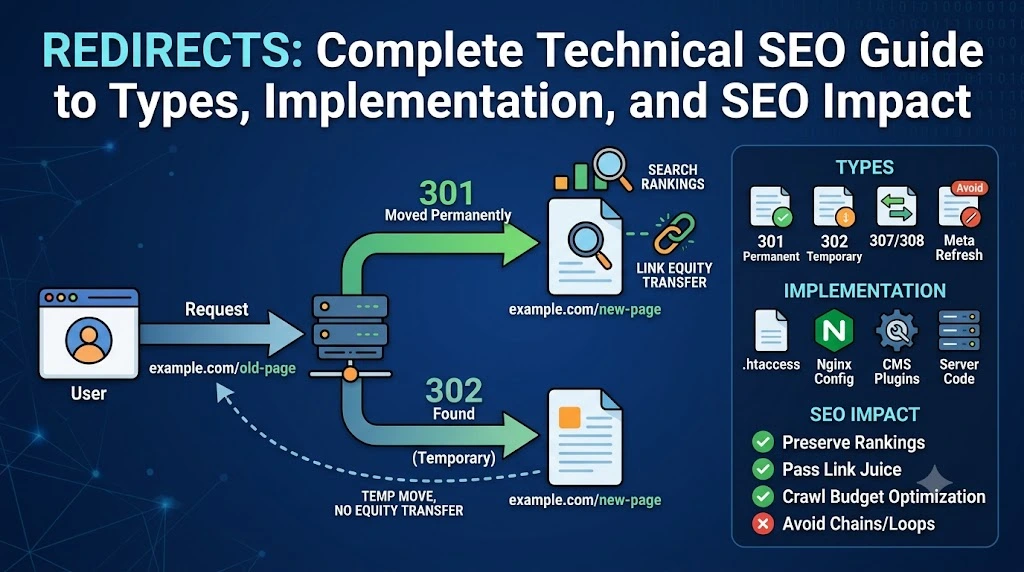
Redirect is an automatic method that sends users and search engines from one URL to another, preserving rankings and link equity whilst preventing broken links.
How Do Redirects Work?
A redirect automatically sends users and search engines from one URL to another. When someone requests yoursite.com/old-page, the server responds with a redirect instruction forwarding them to yoursite.com/new-page (or any other URL). The browser or search engine follows the redirect automatically without user intervention.
Redirects operate at the server level (preferred for SEO) or at the client level (in the user’s browser). Server-side redirects return HTTP status codes that tell search engines exactly what happened. Client-side redirects execute in the browser after the page loads, making them slower and less reliable.
Why Redirects Matter: SEO and UX Impact
Broken redirects are silently destroying your SEO rankings right now. A misplaced redirect, a forgotten redirect chain, or the wrong redirect type can waste crawl budget, dilute link equity, confuse search engines, and destroy user experience. Yet most websites treat redirects as “set it and forget it” technical tasks rather than critical SEO infrastructure requiring systematic planning and monitoring.
Redirects aren’t optional in modern SEO. They’re foundational infrastructure determining whether traffic flows, rankings transfer, and users reach intended destinations. Poorly implemented redirects create invisible damage that accumulates over months until you suddenly notice rankings declining. Properly implemented redirects preserve link equity, maintain rankings through URL changes, and improve user experience simultaneously.
Three critical things depend on redirects working correctly:
1 – Link equity transfer
When you redirect page A to page B, search engines should transfer ranking power (backlinks, domain authority signals, and accumulated relevance) from the old URL to the new URL. 301 redirects pass nearly all equity. 302 redirects typically don’t, treating the original URL as canonical.
2 – Ranking preservation
Without redirects, deleted pages return 404 errors. Users hit dead ends. Search engines stop indexing those URLs. Every backlink pointing to the old URL becomes worthless. Proper redirects preserve that value.
3 – User experience
Redirects prevent frustration. Without them, users encounter 404 errors, bounce, and never return. That’s traffic and revenue lost. Redirects keep users on your site, reaching relevant content instead of errors.
Crawl efficiency: Too many redirects or redirect chains waste crawl budget. Google allocates limited resources to crawl your site. Inefficient redirects force Google to waste budget following chains instead of discovering new content.
Types of Redirects
Server-Side Permanent
1 – 301 redirects tell search engines that pages have moved permanently. They pass all link equity virtually to the destination URL. Use 301s when:
- Permanently deleting pages
- Changing domain names
- Permanently restructuring URL architecture
- Switching HTTP to HTTPS
HTTP status code: HTTP/1.1 301 Moved Permanently
2 – 308 redirects function identically to 301s for SEO purposes, except they preserve HTTP method (GET/POST) during redirect. Most sites use 301s instead since 308s rarely matter.
Temporary Redirects: When Change Isn’t Permanent
1- 302 redirects signal temporary moves. Search engines typically don’t pass link equity through 302s (instead keeping equity at the original URL). Use 302s for:
- A/B testing page variants
- Temporary promotions
- Maintenance pages
- Temporary product redirects
The critical distinction: 301 = permanent (transfer equity), 302 = temporary (keep original).
2 – 307 redirects are HTTP 1.1 successors to 302s. They work similarly but preserve the HTTP method. Use only for API calls and form submissions requiring POST method preservation. For general temporary redirects, 302s work fine.
3 – 303 redirects forward users to similar resources. Rarely used in SEO contexts, typically for form resubmission prevention.
Client-Side Redirects: Avoid These
1 – Meta refresh redirects execute in the browser after the page loads.
They look like:
<meta http-equiv=”refresh” content=”5; url=https://example.com/”>
Problems: Slow (page loads first, then redirects), unreliable for search engines, poor UX (users see flash of original page), doesn’t pass full link equity.
2 – JavaScript redirects use JavaScript to change the URL: window.location.href = “https://example.com/new-page”
Problems: Client-side execution means the page must render first, Google does not follow them reliably, no HTTP status code is specified, and security vulnerabilities are possible.
Avoid client-side redirects unless genuinely your only option. Server-side redirects outperform in every metric.
Common Redirect Mistakes Destroying SEO
1 – Redirect chains
When URL A>B>C>D, Google follows chains up to 10 hops, but each hop dilutes ranking power. Result: slow user experience, wasted crawl budget, decreased SEO value.
Fix: Map old URLs directly to final destinations. Don’t create intermediate redirects.
2 – Redirect loops
URL A redirects to B, which redirects back to A. This traps crawlers and users. The browser shows the “Too many redirects” error.
Fix: Audit redirects, ensuring no circular paths. Test with tools confirming the final destination is accessible.
3 – Using 302 for permanent moves
Sites redirect old URLs with 302s, then leave them for years. Search engines never transfer equity. Original URL stays indexed.
Fix: Use 301 for permanent moves. Switching from 302 to 301 after-the-fact helps but causes delays.
4 – Redirecting to irrelevant pages
Redirecting a blog post about “running shoes” to the homepage wastes link equity. Google treats this as “soft 404,” ignoring the redirect.
Fix: Redirect to the most relevant page available. If no relevant page exists, return 404 instead.
5 – Ignoring internal links
Setting a redirect, then forgetting to update internal links pointing to the old URL. Forces users and crawlers through unnecessary redirects.
Fix: Update all internal links pointing to redirected URLs. Use Site Audit tools to find outdated links.
6 – Forgetting sitemap updates
Old URLs remaining in the XML sitemap after redirects confuse search engines.
Fix: Remove old URLs from sitemaps. Add new URLs, helping search engines discover them faster.
7 – Not testing redirects
Assuming redirects work without verification. Broken redirects go undetected for months.
Fix: Test every redirect manually or with tools. Monitor Google Search Console for crawl errors.
8 – Redirect everything to the homepage
Sites delete pages and redirect all traffic to the homepage. Users looking for specific content land on the wrong page. Bounce rates spike.
Fix: Redirect to the most relevant existing page. If no relevant page exists, return 404 instead of defaulting to the homepage.
Implementation: How to Actually Set Up Redirects
WordPress (easiest method)
Use the Yoast SEO Premium or RankMath plugin. Go to redirect settings, enter old URL, enter new URL, select type (301/302), save. Done.
Apache servers (.htaccess file)
Redirect 301 /old-page.html https://example.com/new-page.html
Redirect 302 /temporary-page.html https://example.com/new-page.html
Nginx (server config):
server {
    return 301 https://example.com$request_uri;
}
Cloudflare (no code required): Go to Rules > Page Rules, enter old URL, select Forwarding URL, choose status code, enter new URL, save.
PHP:
<?php
header('HTTP/1.1 301 Moved Permanently');
header('Location: https://www.example.com/newurl');
exit();
?>
Best Practices for Redirect Strategy
Preserve old redirects for a minimum of 1 year: Google says signals permanently pass after one year. Keep redirects active at least that long. Ideally, keep forever to handle old backlinks appearing over time.
Redirect HTTP→HTTPS: All sites should use HTTPS. Set up 301 redirects from HTTP to HTTPS versions. Test to ensure all HTTP URLs redirect securely.
Avoid redirect chains: Map old URLs directly to final destinations. Use audit tools to identify chains over 5 hops and consolidate.
Avoid redirect loops: Test redirects, ensuring they reach accessible pages returning 200 status codes. No circular paths.
Reclaim lost link equity: Old pages with backlinks that now return 404 are throwing away authority. Redirect them to relevant pages, reclaiming value.
Update internal links first: Before implementing redirects, update internal links pointing to old URLs. Reduces unnecessary redirect hops.
Monitor redirects quarterly: Broken redirects accumulate over time. Regular audits catch issues before they impact rankings. Remove redirects no longer needed.
Testing and Monitoring Redirects
Manual testing: Type the old URL, verify the browser lands on the new URL. Check the status code with tools like curl or SEO Toolbar.
Automated crawling: Use Site Audit tools (Ahrefs, Moz Pro, Screaming Frog) to crawl sites and report redirect chains, loops, and issues.
Google Search Console: Check Coverage report for crawl errors. The URL Inspection tool shows whether Google considers the redirect temporary or permanent.
Monitoring over time: Track redirects in analytics. If old URLs suddenly get traffic (from old bookmarks, external links), redirects are working. If traffic is zero and old URLs appear in Search Console, redirects will be broken.
When Redirects Hurt SEO
Improperly implemented redirects actively damage SEO:
- Redirect chains waste crawl budget
- 302s used permanently lose link equity
- Redirect loops trap crawlers
- Unnecessary redirects slow pages
- Broken redirects create 404 errors
- Too many redirects confuse search engines
The common theme: redirects are infrastructure. Treat them with the same care as technical SEO fundamentals.
Start Auditing Your Redirects Today
Most websites have redirect problems they don’t know about. Redirect chains, outdated redirects, broken redirects, and 302s are used permanently. These issues accumulate silently until you suddenly notice a ranking decline.
Start with an audit: Crawl your site, identifying all redirects. Check for chains longer than 3 hops, redirect loops, permanent changes using 302s, and outdated redirects no longer needed. Fix high-impact issues first.
Professional technical SEO services conduct systematic redirect audits, ensuring proper implementation across your entire domain, identifying chains, loops, inefficient redirects wasting crawl budget, and opportunities to reclaim lost link equity through strategic redirects. We implement redirects strategically, preserving link equity, maintaining rankings through URL changes, and improving crawl efficiency.
Partner with Cloudex Marketing and audit your redirects this week. Every week they’re misconfigured is another week of losing SEO value.