


A URL is the unique address of a webpage. The text you see at the top of your browser, like example.com/blog/seo-tips.
It tells both people and search engines where a page lives on a website.
An SEO-friendly URL is a clearer, shorter, understandable version of that address.
It uses real words (not random numbers), includes the main topic of the page, and is structured so Google can understand it instantly, while still being easy for humans to read.
| For users | For search engines |
| It should look clean, make sense, and tell them what the page is about before they click. | It should provide context, match search intent, and help Google crawl and rank the page correctly. |
A messy URL confuses everyone.
A clean, SEO-friendly URL guides everyone.
Below, you’ll learn the six-step process used by top-performing websites worldwide, without losing any of the technical accuracy you need.
Step-by-Step Guide to Creating SEO-Friendly URL Structures
Creating URLs that are both user-friendly and search-engine-friendly is crucial for improving your website’s visibility and click-through rates. A well-structured URL helps visitors understand what your page is about at a glance, while also giving search engines clear signals about your content’s topic and hierarchy.
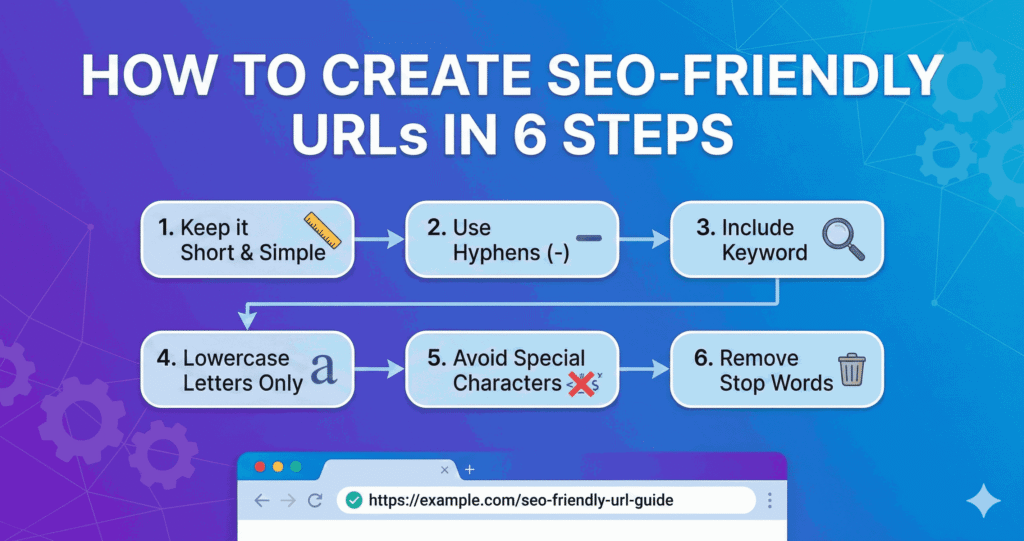
In this guide, we’ll walk you through six actionable steps to craft SEO-friendly URLs that are short, clean, keyword-focused, and logically organized. By following these best practices, you’ll make your website easier to navigate, more attractive to search engines, and more likely to rank higher in search results.
1. Keep Your URLs Short, Simple, and Easy to Scan
Short URLs aren’t just cleaner. They’re strategically superior.
A simple URL tells both search engines and users what to expect from the page.
And in a competitive US market where attention spans are short, clarity always wins.
As a rule of thumb:
- Avoid long strings of folders or unnecessary words
- Cut filler words like “and,” “the,” “with,” “your”
- Keep URLs under 50–60 or a maximum of 66 characters whenever possible
Example:
- www.site.com/blog/how-to-create-the-best-seo-friendly-url-structure-for-your-website-in-2025
- www.site.com/seo-friendly-urls
The second one is clean. Predictable. Human. Searchable.
2. Use Hyphens, Not Underscores (Google Treats Them Differently)
This is a small detail. But a critical one.
Google reads hyphens as separators between words.
Underscores, however, glue words together.
Meaning:
- Seo_friendly_urls: Google reads it as “seofriendlyurls”
- seo-friendly-urls: Google reads it as “seo friendly urls”
Hyphens = correct.
Underscores = avoid.
If you’re updating old URLs, remember:
- Only change URLs if you can redirect properly.
- Mismanaged redirects can cause traffic loss, especially for sites with strong mobile search visibility.
3. Place Your Target Keyword in the URL (But Keep It Natural)
Your primary keyword should appear once in the URL, but never twice. This keeps the structure clean and avoids keyword stuffing.
For this topic, a strong URL looks like:
- /seo-friendly-urls
Or
- /create-seo-friendly-urls
The keyword appears naturally without forcing it.
This is also where semantic variation helps. Google understands related terms like:
- URL optimization
- clean URLs
- URL structure
- SEO URL best practices
These variations reinforce topical relevance across your site.
4. Avoid Stop Words Unless They Improve Clarity
Stop words are small, common words that add minimal meaning to a sentence, and the same applies when using them in URLs. In most cases, you should avoid stop words like:
- and
- of
- the
- with
- to
- for
Google usually ignores them, which means you can too.
However, there are moments when you should retain a stop word, especially if removing it alters the meaning.
For example:
| Unclear Intent | Clear Intent |
| /attorney-fees | /attorney-fees-for-dui |
The second URL includes “for” because it clarifies intent.
Every search query relies on clear intent, especially in commercial service categories, so use stop words only when they improve meaning.
5. Use Lowercase, Always
Some US servers treat uppercase and lowercase URLs as different addresses.
That means:
- /SEO-Friendly-URLs
- And /seo-friendly-urls
could lead to two separate pages.
This can cause:
- duplicate content
- split ranking power
- accidental 404 errors
- mis-indexed pages
Lowercase URLs eliminate that risk.
6. Build a Logical URL Structure That Matches Search Intent
Search engines love order. Users love predictability.
Therefore, your URL structure must support both.
A strong structure follows the logic of your website:
- /services/seo/
- /services/seo/audit/
- /services/seo/technical/
- /blog/seo-friendly-urls/
Each folder communicates hierarchy.
Each page reinforces context.
Each URL builds topical authority within your domain.
This is especially important in competitive locations where search behavior is highly intent-driven.
A good structure makes your website easier for Google to crawl. And easier for users to trust.
Why URLs & SEO-Friendly URLs Are Important?
Strong SEO performance starts with the basics. URLs are one of the most fundamental signals Google uses to interpret your content.
Top-ranking pages consistently use short, clean, SEO-friendly URLs because they improve click-through rates, strengthen trust, and help Google understand a page’s purpose instantly. Yet this simple optimization is still overlooked by many websites.
Google evaluates both the URL itself and how SEO-friendly it is:
- How readable is it?
- Does it reflect the topic?
- Is it structured in a way that aligns with real search intent?
A well-crafted, SEO-friendly URL gives Google immediate context.
A messy or confusing URL forces Google to guess. And guessing always leads to weaker rankings.
For users, the difference is just as important.
A clean, descriptive URL tells people exactly what the page is about before they click, especially on mobile, where clarity drives trust and action.
This is why shorter, SEO-friendly URLs consistently perform better: they’re easier for Google to crawl and easier for people to understand.
Ignore SEO-Friendly URLs & Face Disastrous Results
And when you ignore this? The results can be surprisingly severe. 46% of duplicate content issues stem from URL variations, like tracking parameters or malformed URL structures.
In practical terms, for an e-commerce site, that many duplicate URLs means Google may split ranking signals across dozens or hundreds of versions of essentially the same page, severely diluting your SEO power and damaging your site’s visibility, conversions, and revenue.
Good URLs vs. Poor URLs
Below is a quick comparison table to help sharpen your structure.
| URL Type | Good Example | Poor Example | Why It Matters |
| Length | /digital-marketing-tips | /how-to-get-the-best-digital-marketing-tips-for-beginners-2025-update | Shorter URLs rank better and improve user trust |
| Keyword Usage | /seo-friendly-urls | /best-seo-seo-seo-url-url-tips | Avoid stuffing; use one clear keyword |
| Structure | /blog/seo-friendly-urls | /2025/article/12/seo/topic/guide/urls | Simple structure helps Google crawl efficiently |
| Readability | /local-seo-guide | /lcg1259-page-update | Readable = trustworthy for users and search engines |
This clarity improves ranking potential and reduces bounce rates.
Additional Tips for Creating SEO-Friendly URLs
Here are a few more practical, technical recommendations:
Simple Best Practices
- Use HTTPS (Google treats it as a ranking factor)
- Avoid dynamic parameters when possible
- Use 301 redirects any time you change a URL
- Match the URL with the page’s H1 for consistency
Technical Considerations
- Maintain a clean XML sitemap
- Avoid creating orphan URLs
- Keep URLs crawlable (no blocked folders unless necessary)
High-Impact Details
- Use canonical tags for pages with similar content
- Avoid session IDs in URLs
- Don’t include dates unless strategically needed
These refinements help strengthen your entire SEO foundation.
Benefits of SEO-Friendly URLs
Clean URLs deliver immediate advantages:
- Higher click-through rates from Google search results
- Better user experience on mobile devices
- Faster indexation by search engines
- Increased trust and credibility
- Stronger topical signals for semantic search
When a user recognizes a trustworthy URL, they’re more likely to engage, especially in competitive industries like finance, healthcare, law, and e-commerce.
What You Need to Avoid When Creating URLs?
Even experienced marketers get these wrong:
- Using auto-generated URLs full of numbers
- Changing URLs without redirects
- Adding unnecessary folders
- Stuffing keywords
- Mixing uppercase and lowercase
- Using underscores instead of hyphens
Avoid these, and your site instantly becomes more search-friendly.
If you want expert guidance on structuring URLs that improve search visibility without disrupting your current traffic, Cloudex Marketing can help you make those changes safely and strategically.
What a Good URL Feels Like
A clean URL feels effortless. Smooth to read, easy to remember, and instantly reassuring.
It gives the user a sense of direction, like walking through a well-designed hallway with clear signs instead of wandering through a cluttered maze.
This kind of clarity builds trust.
And trust builds ranking power.
If you’re aiming to create cleaner, more user-centric pages that Google loves to rank, partnering with Cloudex Marketing can help you build that foundation with precision and clarity.
Let’s Conclude & Remember that SEO-Friendly URLs Are a Small Detail With Big Impact
URLs look like a minor element of SEO, but they shape how both users and search engines perceive your website.
Clean, intentional, keyword-aligned URLs can boost crawlability, improve click-through rates, and support stronger rankings across your entire site.
Follow these six steps, and you’ll be far ahead of most websites competing in the world, especially in crowded markets where clarity determines authority.
If you’re ready to refine your website structure and strengthen your SEO performance with expert support, Cloudex Marketing would be glad to help you build a clean, search-friendly foundation that supports long-term growth.